
Interactive Touchscreen Games for Events
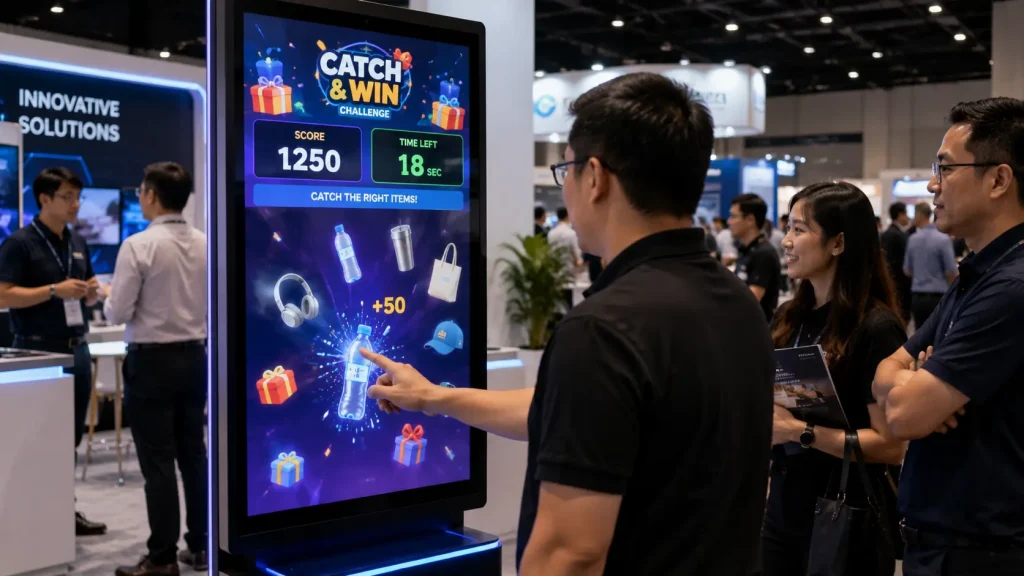
Interactive Touchscreen Games for Events transform touchscreen displays into engaging digital activities that guests can play directly at corporate events, exhibitions, roadshows, conferences and brand activations.
Instead of using a touchscreen only to display information, customised game software allows visitors to tap, swipe, match, answer, react and compete through an intuitive interactive interface.
The experience can be designed around a company’s products, campaign message or event theme, turning a simple touchscreen into an engagement point that attracts visitors while delivering branded content in a more participatory way.
Key Takeaways
- Turn touchscreen displays into interactive event games.
- Choose from quiz, memory, reaction, matching and other game formats.
- Customise gameplay according to company products and event themes.
- Use games at exhibitions, roadshows, conferences and corporate events.
- Collect participant information or scores where required.
- Combine touchscreen games with prizes, leaderboards and big-screen displays.
What Are Interactive Touchscreen Games?
Interactive touchscreen games are digital activities designed specifically for touch-enabled displays.
Participants interact directly with the screen using familiar gestures such as tapping, dragging and swiping, which means many games can be understood without complicated instructions or separate physical controllers.
Depending on the event, touchscreen games can be installed on:
- 43-inch Touchscreen Displays
- 55-inch Interactive Touchscreens
- 65-inch Touchscreen Displays
- 75-inch Interactive Screens
- 86-inch Touchscreens
- 98-inch Interactive Displays
- Portrait Touchscreen Kiosks
- Landscape Touchscreen Kiosks
- Interactive Tables
- Custom Exhibition Touchscreen Displays
The appropriate screen size depends on the game mechanics, available event space and expected number of participants.
Why Touchscreen Games Work Well at Events
Event visitors are often surrounded by booths, displays, videos and promotional materials competing for their attention.
A touchscreen creates a clear opportunity for physical participation.
Instead of simply watching content, visitors can approach the display and immediately interact with it.
Interactive Touchscreen Games for Events work particularly well because the interaction method is already familiar to most users. Guests generally understand how to tap buttons, select answers, drag objects and swipe through interfaces without requiring extensive instructions.
This makes touchscreen games suitable for environments where organisers need activities that are quick to understand and can accommodate a continuous flow of visitors.
Popular Interactive Touchscreen Games for Events
1. Touchscreen Quiz Game
A touchscreen quiz is one of the most versatile event game formats.
Participants answer multiple-choice questions directly on the screen while the system calculates their score and, where required, response time.
Questions can focus on:
- Company Knowledge
- Product Features
- Campaign Messages
- Industry Knowledge
- Health & Awareness Topics
- Educational Content
- General Trivia
This allows companies to combine entertainment with information instead of asking visitors to read lengthy promotional material.
2. Touchscreen Memory Game
A digital memory game asks participants to reveal and match pairs of cards within a limited period.
The cards can use customised graphics such as company products, campaign icons, brand elements or educational content.
The system can record completion time, number of attempts or final score, allowing participants to compete for leaderboard positions or prizes.
3. Catch & Win Game
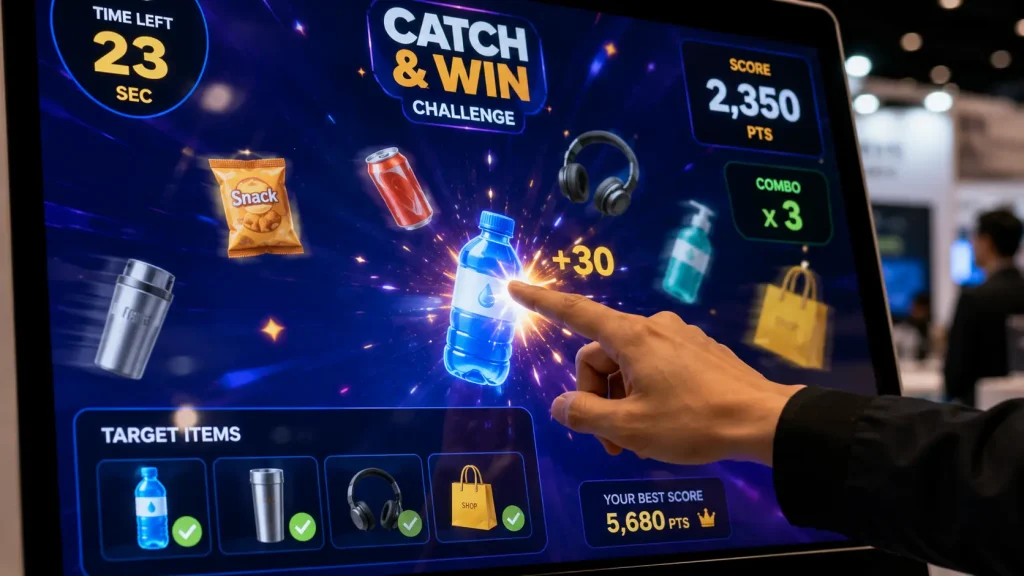
In a touchscreen Catch & Win game, objects move or fall across the display and participants must tap the correct items while avoiding unwanted objects.
The game can be customised around products, ingredients, campaign icons or other branded visual elements.
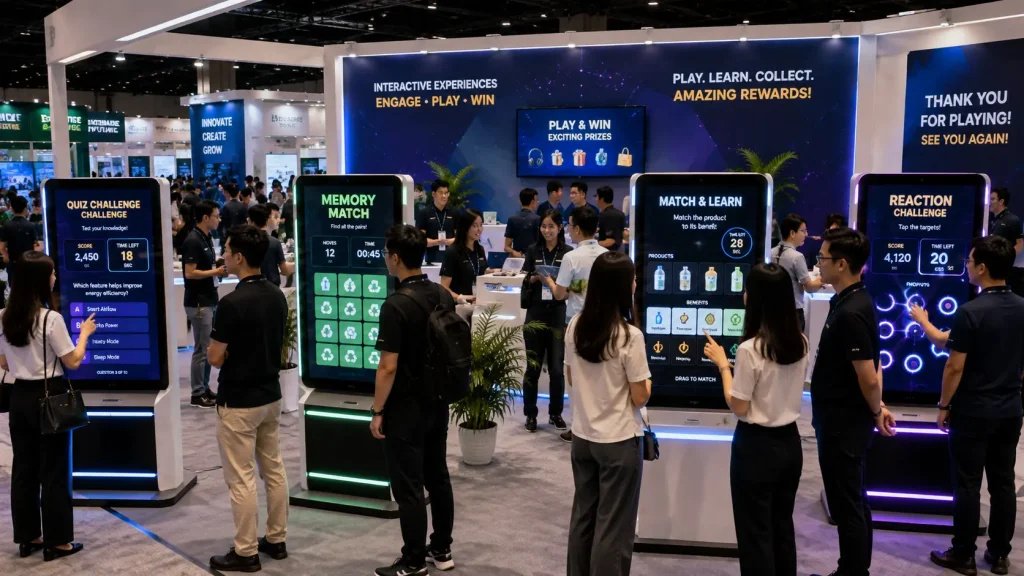
Because the gameplay is easy to understand and visually active, this format works well in exhibition environments where the touchscreen needs to attract attention from people walking past the booth.
4. Product Matching Game
A product matching game asks participants to drag products, features or other objects towards the correct category or destination.
For example, visitors could match:
- Products with their applications
- Features with product models
- Waste items with correct recycling categories
- Foods with nutritional categories
- Services with customer requirements
This makes the game particularly useful when the objective is to communicate information through participation.
5. Touchscreen Reaction Game
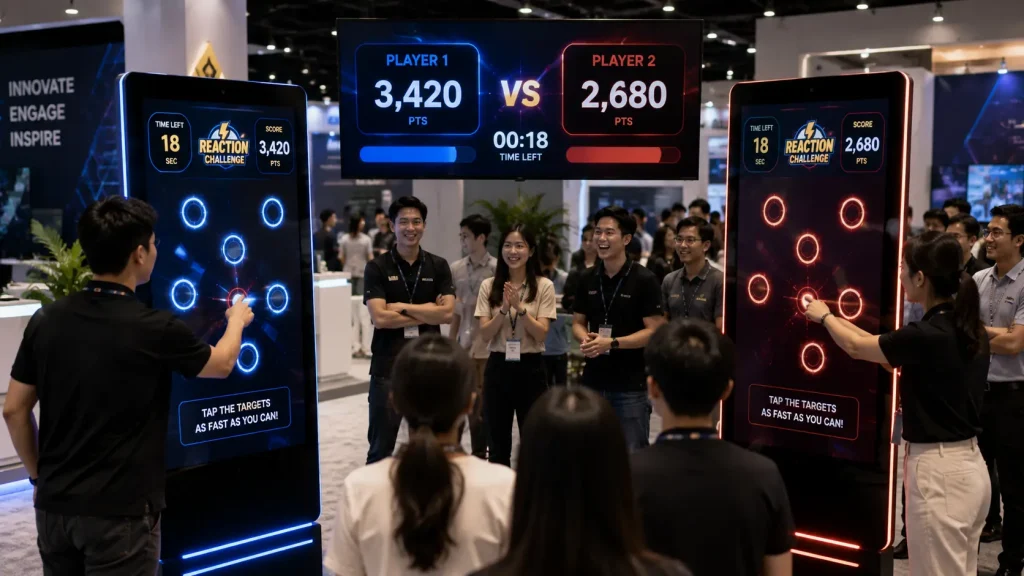
A reaction game challenges participants to tap targets as quickly as possible when they appear at different positions on the touchscreen.
The system can measure reaction speed, successful taps and total score within a predefined time.
Short rounds make this format useful for busy exhibitions and roadshows where many visitors may want to participate throughout the day.
6. Spin & Win Touchscreen Game
A digital Spin & Win experience allows participants to activate a branded prize wheel directly from the touchscreen.
The wheel can contain different prize categories, rewards or outcomes while the visual interface is customised according to the campaign.
Where required, participation rules can be connected with a registration form or participant database before the spin becomes available.
Touchscreen Games for Exhibitions
Exhibition booths usually have limited space and need activities that can operate continuously without interrupting visitor circulation.
A freestanding touchscreen kiosk can provide an interactive experience within a relatively small footprint.
Visitors can approach the kiosk, complete a short game and continue exploring the booth, allowing the activity to serve many participants throughout the exhibition.
Touchscreen games can also help booth staff begin conversations with visitors. Instead of immediately approaching someone with a sales presentation, the game provides a natural first interaction before staff introduce the relevant product or service.
Touchscreen Games for Roadshows & Brand Activations
Roadshows often require the same interactive experience to be deployed repeatedly across shopping malls, retail locations or campaign venues.
A touchscreen game can be developed once and reused across multiple event locations, subject to the hardware and campaign requirements.
The software can maintain consistent gameplay and branding while individual locations use the same interaction flow.
Where participant data or scores need to be consolidated across different roadshow locations, the system architecture can be designed accordingly.
Turning Product Information into Gameplay
One of the strongest applications of Interactive Touchscreen Games for Events is transforming product information into something visitors actively explore.
Instead of presenting five product benefits as bullet points on a display, those same benefits can become part of a quiz, matching challenge or interactive mission.
For example, an automotive brand could ask participants to match vehicle features with different driving scenarios, while a healthcare campaign could use a quiz to teach visitors about prevention and healthy habits.
The objective is not simply to add a game beside the product. The stronger approach is to make the product or campaign message part of the gameplay itself.
Hardware Options
Interactive Touchscreen Games for Events can be deployed using different touchscreen sizes and configurations depending on the venue, game mechanics, visitor traffic and available booth space.
For exhibitions and roadshows, freestanding portrait kiosks are often suitable for individual gameplay, while larger landscape displays can provide a more visible experience for groups of visitors.
- 43-inch Interactive Touchscreen
- 55-inch Freestanding Touchscreen Kiosk
- 65-inch Interactive Display
- 75-inch Large-format Touchscreen
- 86-inch Interactive Event Display
- 98-inch Premium Touchscreen Display
- Portrait Touchscreen Kiosk
- Landscape Touchscreen Kiosk
- Wall-mounted Interactive Display
- Interactive Touch Table
- Custom Touchscreen Game Station
The final hardware configuration can be selected according to whether the experience is designed for one participant at a time, head-to-head competition or larger group interaction.
Interactive Game Software Features
Every campaign has different engagement objectives. Rather than using the same generic game for every event, the software can be customised around the campaign concept, audience and desired interaction.
Available features can include:
- Custom Game Mechanics
- Touch & Swipe Interaction
- Drag & Drop Gameplay
- Countdown Timer
- Live Score Calculation
- Reaction Time Measurement
- Multiple Game Levels
- Difficulty Levels
- Randomised Questions
- Custom Product Content
- Player Registration
- Leaderboard
- Prize Eligibility
- QR Code Integration
- Custom Event Branding
- Sound Effects & Animation
- Multi-language Support
- Game Result Database
Registration & Lead Collection
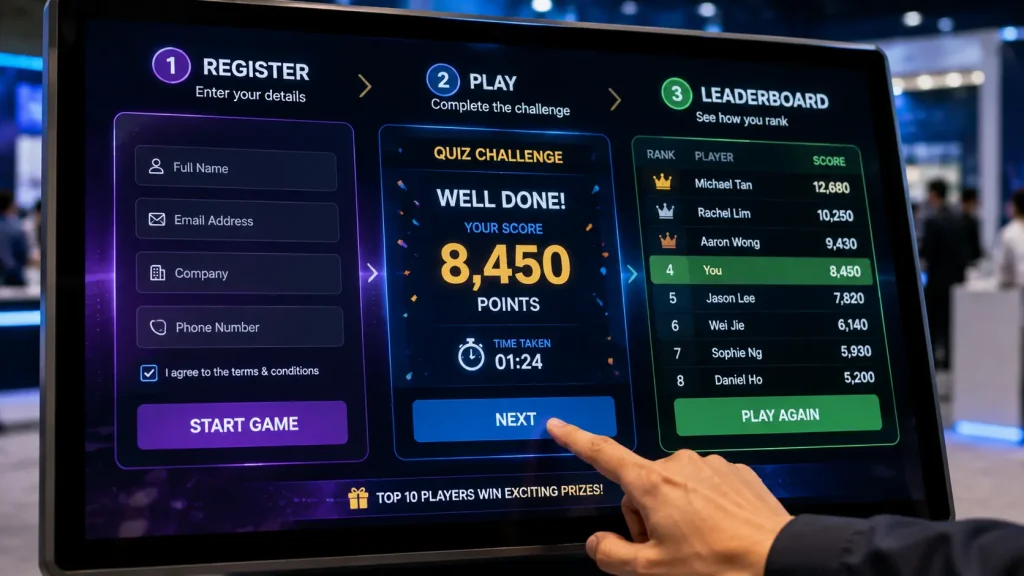
For exhibitions and brand activations, the touchscreen game can optionally include a registration step before gameplay begins.
Participants can enter selected information such as:
- Name
- Email Address
- Contact Number
- Company
- Job Title
- Participant ID
- Other Campaign-specific Fields
Once registration is completed, the participant can proceed directly into the game.
This allows the interactive experience to combine engagement with lead collection where appropriate. The registration form and data fields can be customised according to the campaign requirements.
Where personal information is collected, organisers should determine the appropriate consent notice, privacy requirements and intended use of the data before deployment.
Leaderboard & Competitive Gameplay
Adding a leaderboard can turn a short touchscreen activity into an ongoing competition throughout an event.
After completing the game, participants can see their score or completion time and compare their performance with other players.
A leaderboard can display information such as:
- Player Name
- Score
- Completion Time
- Ranking
- Team
- Game Round
For example, an exhibition could run the same reaction game throughout the day and award prizes to the highest-scoring participants before the event closes.
The leaderboard can appear on the touchscreen itself or be displayed separately on another screen where required.
Connecting Touchscreen Games to a Big Screen
A touchscreen does not always need to operate as a standalone display.
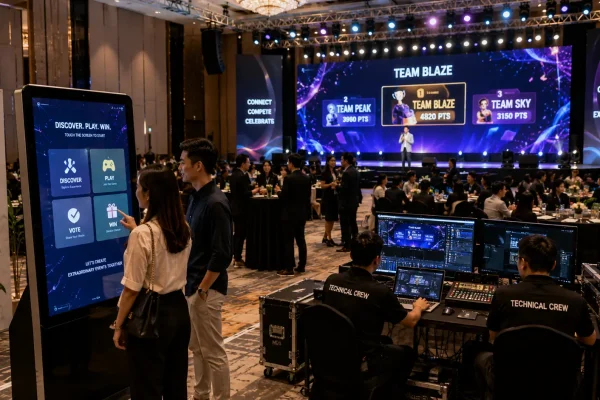
For larger corporate events, the touchscreen can function as the participant’s controller while gameplay, scores or results are displayed on a separate large LED screen.
A typical setup could include:
- Participant interacts with touchscreen
- Touchscreen sends input to the game system
- Game responds in real time
- Main LED screen displays gameplay or results
- Audience follows the activity from the event space
This configuration combines the intuitive control of a touchscreen with the visibility of a large event display.
Prize Integration
Touchscreen games can also be connected with different prize mechanics.
Depending on the campaign, participants may receive rewards based on:
- Final Score
- Completion Time
- Leaderboard Ranking
- Successful Challenge Completion
- Random Prize Selection
- Spin & Win Result
The system can display a digital prize result after gameplay or provide information for event staff to verify before distributing a physical reward.
For campaigns with limited prize quantities, prize allocation rules can be incorporated into the game logic according to the project requirements.
Multiple Touchscreen Game Stations
Busy exhibitions and large corporate events may require more than one game station to reduce waiting time.
The same game can be deployed across multiple touchscreen kiosks so several visitors can participate simultaneously.
Possible configurations include:
- 2 Touchscreen Game Stations
- 4 Touchscreen Game Stations
- Multiple Exhibition Booth Kiosks
- Head-to-Head Touchscreen Competition
- Different Games Across Multiple Stations
Where required, multiple stations can share participant scores or leaderboard information through a connected system.
This makes the setup suitable for larger exhibitions where visitor traffic may increase significantly during peak periods.
Head-to-Head Touchscreen Competition
Two touchscreen stations can also be configured as a direct competition between participants.
For example, two players could compete simultaneously in:
- Reaction Challenges
- Quiz Battles
- Memory Games
- Matching Challenges
- Speed Challenges
The system can compare both results before displaying the winner on the touchscreens or an additional event display.
This format can create stronger spectator engagement because visitors waiting nearby can watch two participants compete rather than seeing only individual gameplay.
Can Touchscreen Games Work Offline?
Yes. Many Interactive Touchscreen Games for Events can be configured to operate locally without continuous internet access.
The game software can run directly from a connected computer or mini PC, allowing gameplay, scoring and local data storage to continue even when venue internet connectivity is unavailable.
Internet connectivity may still be required when the experience includes:
- Cloud-based Participant Database
- Real-time Online Leaderboard
- Web-based Registration
- Remote Content Updates
- Cross-location Data Synchronisation
The connectivity requirement should therefore be planned according to the event workflow rather than relying entirely on public venue Wi-Fi.
Touchscreen Game Setup for Exhibitions
For exhibition applications, the game should be designed around visitor flow rather than only visual appearance.
A typical visitor journey could be:
- Visitor notices the interactive touchscreen
- Simple instruction invites the visitor to participate
- Optional registration is completed
- Game begins immediately
- Participant completes a short challenge
- Score or result appears
- Leaderboard or prize result is displayed
- Experience automatically resets for the next visitor
Short gameplay sessions are generally useful for high-traffic environments because they allow more visitors to participate without creating long queues.
The experience should also reset automatically after each session so the next participant sees a clear starting screen.
Customising Games Around Your Product
Customisation should go beyond placing a company logo on a generic game.
A stronger interactive experience incorporates the actual product, service or campaign message into the gameplay.
For example:
- Automotive — Match vehicle features to driving scenarios
- Healthcare — Complete a reaction or awareness challenge
- FMCG — Catch the correct products or ingredients
- Technology — Match solutions with business challenges
- Education — Complete quizzes and knowledge challenges
- Sustainability — Sort waste into the correct recycling categories
- Property — Match facilities or unit features with buyer preferences
This allows participants to learn about the brand while actively playing instead of receiving the information through a conventional presentation.
Planning an Interactive Touchscreen Game
Before developing an interactive game, organisers should consider:
- Event Type
- Target Audience
- Campaign Objective
- Expected Visitor Traffic
- Available Floor Space
- Touchscreen Size
- Number of Game Stations
- Ideal Gameplay Duration
- Game Difficulty
- Registration Requirements
- Leaderboard Requirements
- Prize Mechanics
- Internet Availability
- Brand & Product Content
For many exhibitions and roadshows, a game that visitors can understand within a few seconds and complete within approximately one to two minutes can provide a practical balance between engagement and visitor throughput.
Why Choose MyDigital Asia?
MyDigital Asia develops customised Interactive Touchscreen Games for Events for corporate events, exhibitions, roadshows, conferences and brand activations throughout Malaysia.
Our solutions can include:
- Custom Touchscreen Game Development
- Touchscreen Quiz Games
- Memory Games
- Catch & Win Games
- Reaction Games
- Product Matching Games
- Spin & Win Games
- Custom UI / UX Design
- Registration & Lead Collection
- Leaderboard Systems
- Prize Integration
- Multi-Kiosk Deployment
- Touchscreen Hardware Rental
- Custom Touchscreen Kiosks
- On-site Setup & Technical Support
Frequently Asked Questions
What are Interactive Touchscreen Games for Events?
Interactive Touchscreen Games are customised digital activities that allow event visitors to play directly on a touch-enabled display using actions such as tapping, swiping and dragging.
What touchscreen sizes can be used?
Touchscreen games can be deployed across different display sizes, including 43-inch, 55-inch, 65-inch, 75-inch, 86-inch and 98-inch screens, depending on the event and game requirements.
Can the game be customised to our brand or product?
Yes. Game mechanics, graphics, products, questions, campaign messages, animations and interface design can be customised according to the brand and event concept.
Can the touchscreen collect participant information?
Yes. An optional registration form can be included before gameplay where participant information is required for lead generation, prize eligibility or event management.
Can the system display a leaderboard?
Yes. Scores, completion times and player rankings can be recorded and displayed through a live or locally managed leaderboard.
Can two participants compete against each other?
Yes. Two or more touchscreen stations can be configured for selected multiplayer or head-to-head game concepts.
Can the game work without internet?
Yes. Many touchscreen games can operate locally without continuous internet access. Online connectivity may still be required for cloud databases, online registration or cross-location synchronisation.
Can we use our existing touchscreen?
Potentially, yes. Compatibility depends on the touchscreen hardware, operating system, computer specifications, screen resolution and connectivity. The existing setup should be reviewed before deployment.
Can the same game be reused for multiple roadshows?
Yes. A game can be designed for repeated deployment across multiple event locations, subject to the agreed software, hardware and campaign requirements.
How long should each game session be?
For busy exhibitions and roadshows, short sessions of approximately one to two minutes are often practical because they maintain visitor flow while still providing enough time for meaningful interaction.
Related Articles
- Interactive Event Technology Malaysia
- Interactive Event Ideas Malaysia
- Big Screen Interactive Games Malaysia
- QR Event Registration System Malaysia
- Digital Lucky Draw System Malaysia
- Interactive Games Malaysia
- Interactive Touchscreen Malaysia
Turn Your Event Touchscreen into an Interactive Experience
Interactive Touchscreen Games for Events can turn a standard display into an engaging activity that attracts visitors, communicates campaign messages and creates measurable participation.
MyDigital Asia provides customised game development, touchscreen hardware, registration and lead collection, leaderboard systems, prize integration, multi-kiosk deployment and on-site technical support for exhibitions and corporate events across Malaysia.
Contact MyDigital Asia today to discuss an Interactive Touchscreen Game for your next exhibition, roadshow or corporate event.
Request a Free Consultation
Looking for Interactive Maps, Interactive Solutions or Event Technology?

LATEST POSTS