
QR Event Registration System Malaysia
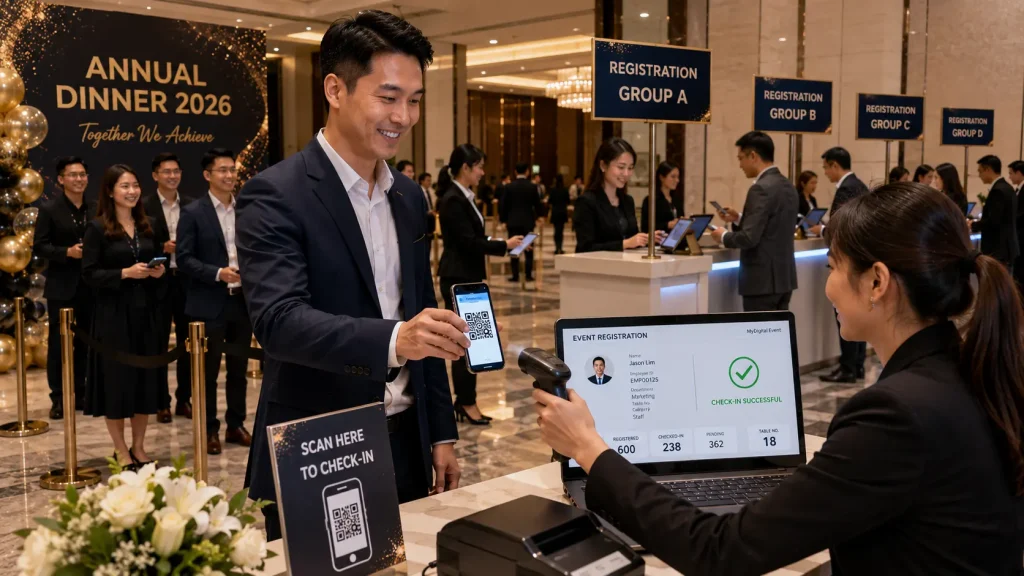
A QR Event Registration System Malaysia helps companies manage guest registration and event check-in using unique QR codes instead of relying entirely on printed guest lists and manual attendance processes.
Before the event, registered guests can receive an individual QR code. When they arrive, event staff scan the code to identify the guest, verify registration and update their check-in status within the event database.
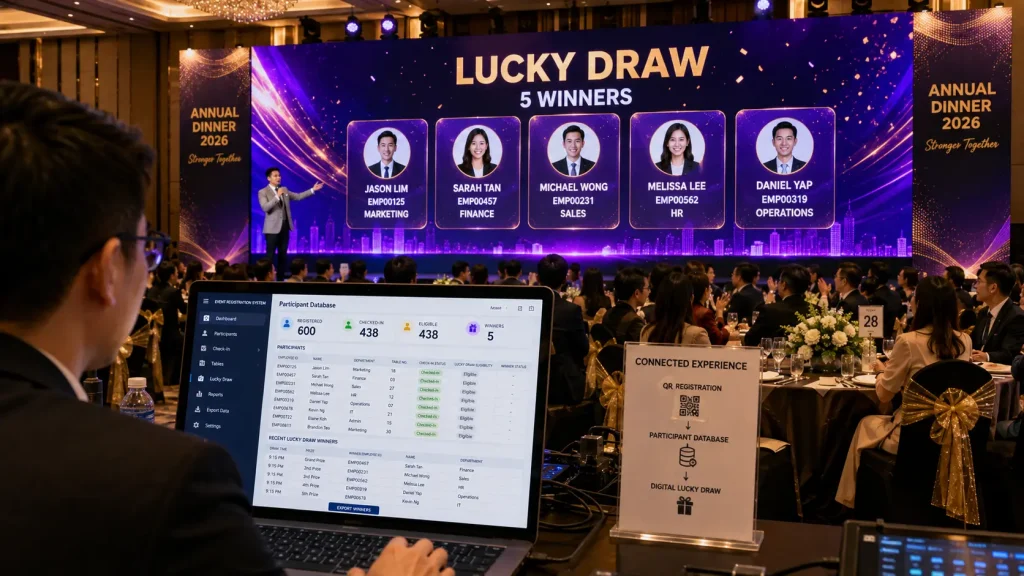
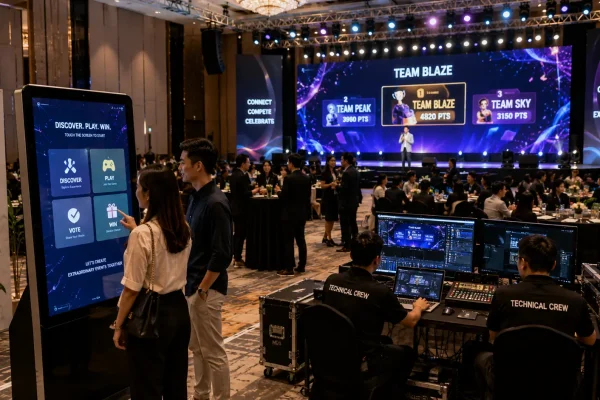
The same participant database can also connect with digital lucky draws, interactive games, table assignments and other event activities, creating a more connected digital event experience from arrival until the end of the programme.
Key Takeaways
- Allow guests to check in using individual QR codes.
- Reduce manual searching through printed registration lists.
- Track registered and checked-in participants.
- Connect guest information with digital lucky draws and event activities.
- Support corporate events, annual dinners, conferences and launches.
What Is a QR Event Registration System?
A QR event registration system is a digital platform that uses QR codes to identify guests when they arrive at an event.
Each participant can be assigned a unique QR code connected to information stored within the event database.
Depending on the project requirements, participant information may include:
- Guest name
- Employee or participant ID
- Company or department
- Email address
- Contact information
- Table number
- Guest category
- Registration status
- Check-in status
- Lucky draw eligibility
When the QR code is scanned, the system retrieves the relevant participant record and confirms whether the guest is registered for the event.
This allows event staff to manage arrivals through a digital interface instead of manually searching through long spreadsheets or printed name lists.
How Does QR Event Registration Work?
A typical QR Event Registration System can follow a simple process from guest registration to event-day check-in.
Step 1 — Prepare the Guest Database
The organiser provides or creates a participant database containing the information required for the event.
For an internal corporate event, this might include employee names, staff IDs, departments and table assignments. For a public event or conference, participants may instead submit their information through an online registration form.
Step 2 — Generate Unique QR Codes
Each registered participant receives a unique QR code connected to their individual database record.
The QR code can be distributed through email, messaging platforms, digital invitations or other communication channels before the event.
Step 3 — Guest Arrives at the Event
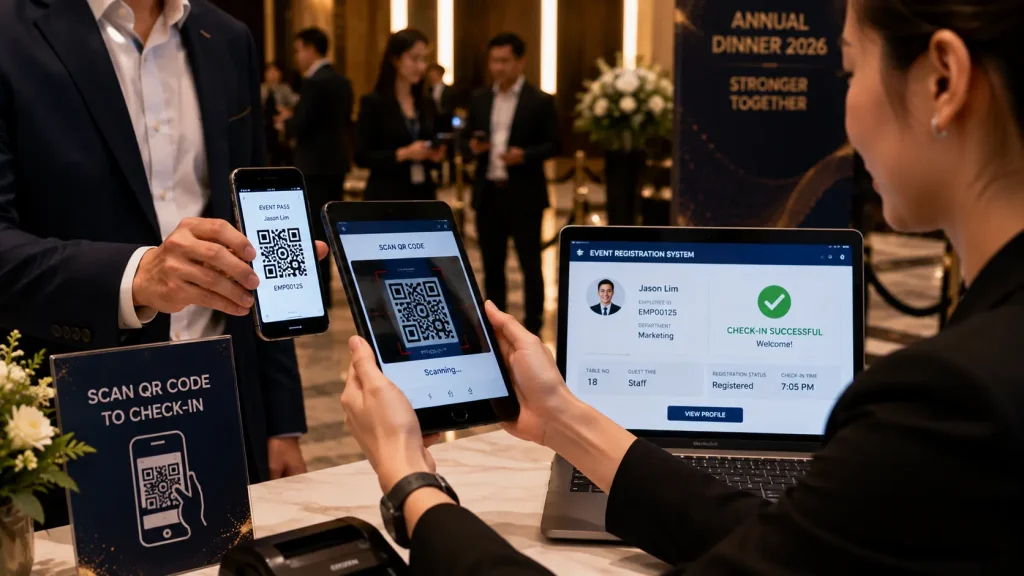
When the participant arrives, they present the QR code on their smartphone.
Event staff scan the code using the configured registration device and the participant record appears on screen.
Step 4 — Verify Registration
The system confirms the participant’s registration information and can display relevant details such as name, department, guest category or table assignment.
Step 5 — Update Check-In Status
If attendance tracking is required, the participant can be marked as checked in. The database is updated so event organisers can view attendance information during or after the event.
QR Registration for Corporate Annual Dinners
Corporate annual dinners can involve hundreds or even thousands of employees arriving within a relatively short period.
When registration is handled manually, staff may need to search through long guest lists while queues begin forming at the entrance.
A QR Event Registration System Malaysia can simplify this process by allowing staff to identify participants through their individual QR codes.
For example, an annual dinner registration journey could work as follows:
- Employee receives an event registration link or QR code
- Employee completes the required information
- Participant record enters the event database
- Employee presents the QR code upon arrival
- Registration staff scan and verify the participant
- Table or group information can be displayed
- Participant becomes eligible for selected event activities
The same database can continue to support other parts of the annual dinner instead of becoming useful only during registration.
Connecting QR Registration with Digital Lucky Draw
One of the most useful integrations for corporate events is connecting the registration database with a digital lucky draw system.
Depending on the organiser’s requirements, lucky draw eligibility can be based on registered participants, checked-in participants or another predefined participant group.
The system can also apply rules such as:
- Prevent previous winners from winning again
- Select one or multiple winners
- Create different participant pools for different prizes
- Exclude selected participant categories
- Record winner information
- Display winner details on the main event screen
This allows registration and lucky draw management to operate through a connected participant database while the audience sees a customised visual experience on the main LED screen.
More Than Just Attendance Tracking
A QR registration system does not necessarily need to function only as an attendance tool.
For some events, organisers may simply want guests to submit their details through a QR registration form so the information can later be used for lucky draws, games or other activities without requiring a formal attendance check-in process.
The workflow can therefore be customised according to the event requirement rather than forcing every event to follow the same registration process.
This flexibility is particularly useful for annual dinners, exhibitions, conferences, roadshows and corporate events where different organisers may require different levels of participant management.

Registration Hardware Options
A QR Event Registration System Malaysia can be configured with different hardware depending on the number of guests, venue layout, registration flow and event requirements.
For smaller events, a simple tablet or laptop-based setup may be sufficient. Larger corporate events can use multiple registration counters operating from the same participant database to help manage higher guest volumes.
- Tablet Registration Station
- Laptop Registration Counter
- QR Code Scanner
- Tablet Camera QR Scanning
- Smartphone QR Scanning
- Touchscreen Registration Kiosk
- Self-Service Registration Kiosk
- Multiple Registration Counters
- Registration Display Screen
- On-site Network Setup
QR Registration Software Features
Every event has a different registration workflow. The software can therefore be customised according to the participant information, check-in process and event activities required by the organiser.
Depending on the project requirements, features can include:
- Unique Participant QR Codes
- Guest Database Management
- QR Code Check-In
- Participant Search
- Manual Check-In
- Duplicate Check-In Detection
- Registration Status
- Attendance Status
- Employee ID Management
- Department & Group Information
- Table Assignment
- Guest Category Management
- Lucky Draw Eligibility
- Multiple Registration Counters
- Real-time Registration Updates
- CSV Import & Export
- Custom Event Branding & UI
Guest Database Management
The participant database is the foundation of the registration system.
For internal corporate events, organisers can provide an existing employee or guest list before the event. The data can then be prepared and imported into the registration platform.
Depending on the event requirements, the database may contain:
- Full Name
- Employee ID
- Department
- Company
- Email Address
- Contact Number
- Table Number
- Guest Category
- Registration Status
- Check-In Status
- Lucky Draw Status
- Winner Status
Only information required for the event should be collected and managed. The exact database fields can be customised according to the organiser’s workflow and data requirements.
Multiple Registration Counters
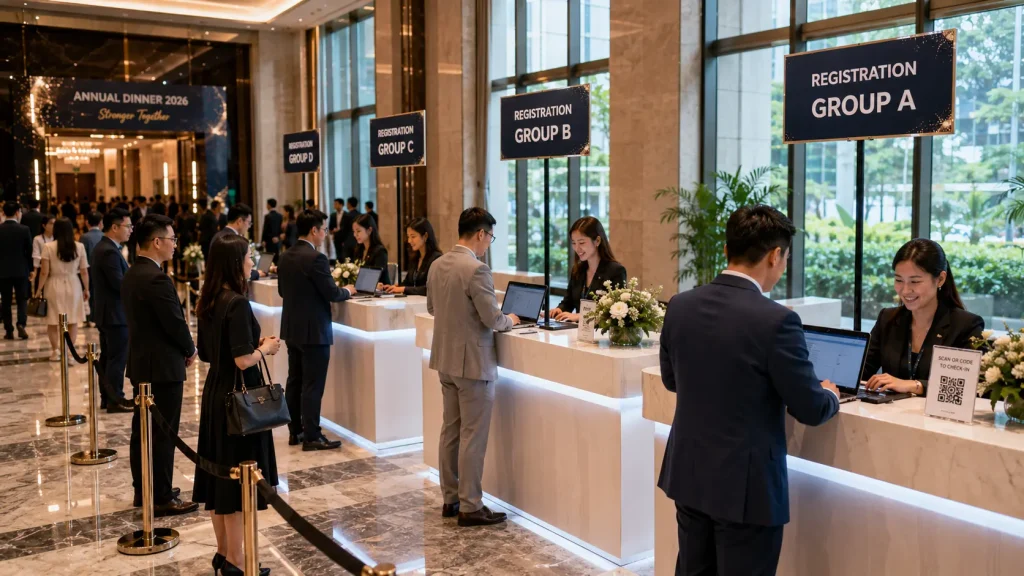
For large annual dinners and corporate events, several registration counters can be used simultaneously to reduce congestion during peak arrival periods.
Each counter can access the same participant database so registration staff can scan QR codes, search for guests and update registration information from different stations.
For example, a 600-person annual dinner could divide registration counters according to employee groups, departments, alphabetical ranges or another organiser-defined structure.
- Counter A — Guest Group 1
- Counter B — Guest Group 2
- Counter C — Guest Group 3
- Counter D — Guest Group 4
Alternatively, all counters can access the complete database, allowing guests to approach any available registration station.
The most suitable configuration depends on the expected arrival pattern, venue entrance layout and number of registration staff available.
Table Assignment & Guest Information
For annual dinners and gala events, the registration system can also display table information after a participant has been identified.
When a QR code is scanned, the registration screen can show information such as:
- Guest Name
- Employee ID
- Department
- Table Number
- Guest Category
- Registration Status
This can help registration staff direct guests towards their assigned tables without relying on separate printed seating lists.
Where required, table assignment information can also be prepared before the event and imported together with the participant database.
QR Registration Without Attendance Check-In
Not every event requires formal attendance tracking.
For some corporate events, the QR code can simply direct guests to an online registration form where they submit the required information before becoming eligible for a lucky draw or interactive activity.
A simplified workflow could be:
- Guest scans the event QR code
- Registration form opens on the guest’s smartphone
- Guest submits the required information
- System checks for duplicate entries where required
- Participant information enters the event database
- Participant becomes eligible for the digital lucky draw
This approach can be useful when the organiser does not need to record the exact arrival time or attendance status of every guest but still requires a structured participant database.
Connecting Registration with Interactive Games
The participant database can also support interactive activities beyond the lucky draw.
Depending on the game concept, registered participant information can be used to:
- Select random game participants
- Display employee names on the main LED screen
- Assign participants to teams
- Load participant photographs into compatible games
- Track game scores
- Create leaderboards
- Manage prize eligibility
This allows registration to become the starting point of a larger interactive event journey rather than operating as an isolated system at the entrance.
Digital Lucky Draw Integration
A QR Event Registration System can connect directly with a customised digital lucky draw displayed on the event’s main LED screen.
When it is time for the lucky draw, the system retrieves eligible participant records from the database and uses them within the draw interface.
Different draw configurations can include:
- Single Winner Draw
- Multiple Winner Draw
- 5 Winners at Once
- 10 Winners at Once
- Different Prize Categories
- Department-specific Draws
- Random Employee Selection
- Previous Winner Exclusion
- Winner History
The visual interface can also be customised according to the annual dinner theme, event branding or campaign concept.
Data Export & Event Reporting
Participant information collected through the registration system can be exported after the event for organiser records and reporting, subject to the configured system and data requirements.
Typical export information may include:
- Registered Participants
- Checked-In Participants
- Employee IDs
- Departments
- Table Assignments
- Registration Time
- Lucky Draw Eligibility
- Lucky Draw Winners
- Selected Game Results
CSV export can be provided where required, allowing organisers to review the information using common spreadsheet software.
Does QR Event Registration Require Internet?
The connectivity requirement depends on how the registration system is designed.
A web-based registration form normally requires internet connectivity because participant information is submitted to an online database.
For event venues where public internet reliability is a concern, a dedicated connection or local network configuration can be considered depending on the project requirements.
Selected local registration and interactive systems may also be configured to operate within a local network, reducing dependence on public venue Wi-Fi.
Internet and network requirements should therefore be reviewed before the event rather than assuming the venue’s public Wi-Fi will be sufficient for a large registration deployment.
Planning Registration for Large Corporate Events
Technology alone does not determine whether event registration will be smooth. The physical guest flow and operational plan are equally important.
Before deploying a registration system, organisers should consider:
- Total number of guests
- Expected arrival period
- Number of registration counters
- Number of registration staff
- Venue entrance layout
- Guest grouping method
- QR code distribution method
- Internet or local network availability
- Walk-in guest procedure
- Missing QR code procedure
- Duplicate registration rules
- Lucky draw eligibility rules
A well-planned registration process combines the digital system with clear signage, trained registration staff and an organised guest flow.
Why Choose MyDigital Asia?
MyDigital Asia develops customised QR Event Registration System Malaysia solutions for annual dinners, corporate events, conferences, product launches and other event applications.
Our solutions can include:
- QR Event Registration
- Guest Database Development
- Online Registration Forms
- QR Code Generation
- Event Check-In Systems
- Multiple Registration Counters
- Table Assignment Integration
- Digital Lucky Draw Integration
- Interactive Game Integration
- Participant Management
- Custom Registration UI / UX
- CSV Import & Export
- Event Hardware Setup
- On-site Technical Support
Frequently Asked Questions
What is a QR Event Registration System?
A QR Event Registration System uses QR codes to identify or register participants digitally. Depending on the event workflow, guests can receive individual QR codes before the event or scan a common QR code to complete an online registration form.
Can the system handle 500 or more guests?
Yes. The system can be configured for large corporate events, with multiple registration counters or online registration workflows used according to the expected number of participants and arrival pattern.
Can we import our existing employee list?
Yes. Existing participant information can typically be prepared and imported into the registration database using a structured data file such as CSV.
Can the system show table numbers?
Yes. Table assignment can be stored within the participant database and displayed when the guest is identified during registration.
Can guests register without individual QR codes?
Yes. A common event QR code can direct guests to an online registration form where they submit their information. This workflow can be used when individual QR codes are not required.
Can registration connect directly to the lucky draw?
Yes. Registered or checked-in participants can be included in the digital lucky draw according to the organiser’s eligibility rules.
Can previous lucky draw winners be excluded automatically?
Yes. The lucky draw system can be configured to record winners and remove them from subsequent draws where required.
Can the system select 10 winners at once?
Yes. The digital lucky draw can be configured to display multiple winners simultaneously, including batches such as five or ten winners depending on the event requirements and screen design.
What happens if a guest loses their QR code?
Where participant search is enabled, registration staff can search the database using information such as the guest’s name or employee ID and verify the participant manually.
Does the system require internet access?
Web-based registration normally requires internet connectivity. Selected event workflows may instead use local network configurations depending on the venue, system architecture and project requirements.
Related Articles
- Interactive Event Technology Malaysia
- Interactive Event Ideas Malaysia
- Big Screen Interactive Games Malaysia
- Digital Lucky Draw System Malaysia
- Interactive Games Malaysia
- Interactive Touchscreen Malaysia
- Interactive Annual Dinner Technology
Create a Faster, Smarter Event Registration Experience
A QR Event Registration System Malaysia can simplify guest registration while creating a participant database that connects with table assignments, interactive games and digital lucky draws.
MyDigital Asia provides customised QR registration systems, participant database development, event check-in solutions, digital lucky draw integration, event hardware and on-site technical support for corporate events across Malaysia.
Contact MyDigital Asia today to discuss a QR registration system for your next annual dinner, conference or corporate event.
Request a Free Consultation
Looking for Interactive Maps, Interactive Solutions or Event Technology?



LATEST POSTS