
Digital Lucky Draw System Malaysia
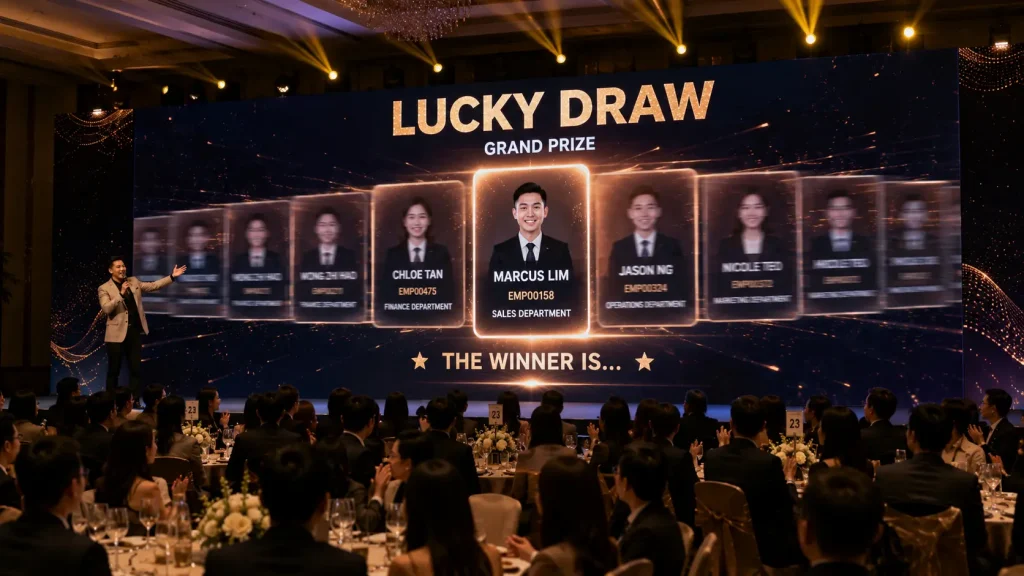
A Digital Lucky Draw System Malaysia transforms the traditional lucky draw into an interactive big-screen experience for annual dinners, corporate events, conferences, product launches and company celebrations.
Instead of manually drawing names from a box, participant information can be loaded into a customised digital system that randomly selects winners while animations, names, employee IDs or photographs appear on the main event LED screen.
The system can also connect with QR registration, participant databases and event check-in systems, allowing organisers to control exactly who is eligible for each prize while automatically managing previous winners.
Key Takeaways
- Randomly select winners from an approved participant database.
- Display lucky draw animations and winners on the main LED screen.
- Draw one or multiple winners simultaneously.
- Automatically prevent previous winners from winning again.
- Connect the lucky draw with QR registration and event check-in.
- Customise the interface according to company branding and event themes.
What Is a Digital Lucky Draw System?
A digital lucky draw system is customised software that randomly selects winners from a predefined participant database during an event.
The participant list can contain information such as:
- Employee Name
- Employee ID
- Department
- Company
- Table Number
- Participant Number
- Photograph
- Prize Eligibility
- Registration Status
- Winner Status
When the lucky draw begins, eligible participants can appear within an animated interface displayed on the event’s main LED screen.
The emcee or authorised operator activates the draw and the system randomly selects the required winner or winners.
Once confirmed, the winning participant can automatically be recorded within the system and excluded from future draws if the event rules require each participant to win only once.
How Does a Digital Lucky Draw Work?
A typical Digital Lucky Draw System follows a simple process from participant database preparation to the final winner announcement.
Step 1 — Prepare the Participant Database
Before the event, the organiser provides an approved participant list containing the information required for the lucky draw.
For an internal corporate event, this may include employee names, staff IDs, departments and other relevant information.
Step 2 — Import Eligible Participants
The participant list is imported into the lucky draw system. Eligibility rules can be configured according to the event requirements.
For example, the organiser may choose to include all registered employees or only participants who have completed event check-in.
Step 3 — Select the Prize Category
Before each draw, the operator selects the appropriate prize category.
Different prize categories can have different numbers of winners and different eligibility rules.
Step 4 — Start the Lucky Draw
The emcee, VIP or event operator activates the draw through a control button, touchscreen, keyboard or other configured trigger.
The main LED screen can display participant names, numbers, photographs or themed animations while the selection is taking place.
Step 5 — Reveal the Winner
After the animation sequence, the selected winner appears prominently on the main event screen.
The interface can display information such as the winner’s name, employee ID, department, photograph and prize category.
Step 6 — Record the Winner
Once the winner is confirmed, the system records the result and can automatically remove that participant from subsequent draws.
Single Winner vs Multiple Winner Lucky Draw
Not every prize needs to be drawn individually.
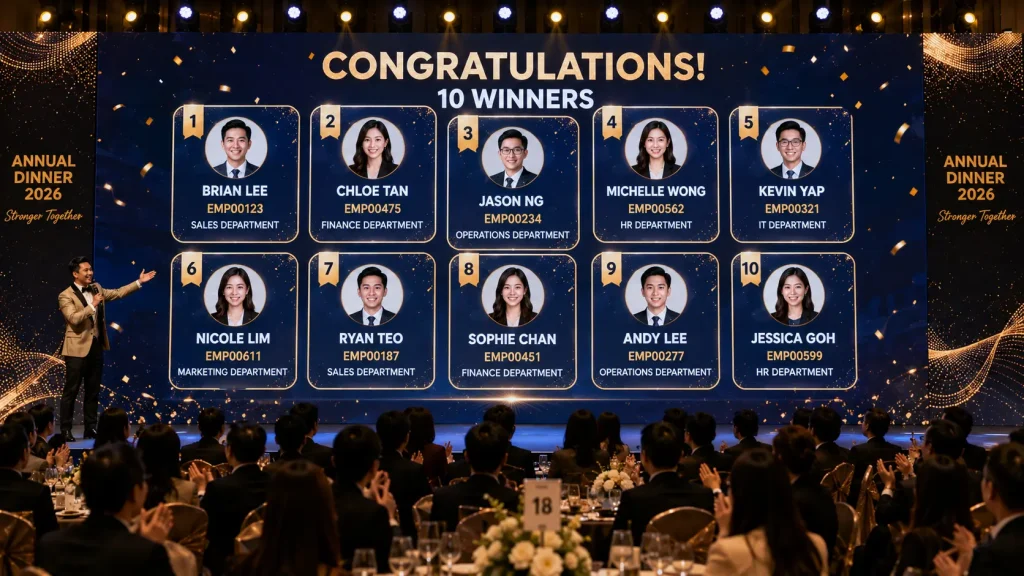
For events with many prizes, a Digital Lucky Draw System Malaysia can be configured to select multiple winners in a single round.
Common configurations include:
- 1 Winner
- 3 Winners
- 5 Winners
- 10 Winners
- 20 Winners
- Custom Number of Winners
For example, smaller consolation prizes could be drawn in batches of ten employees while premium prizes could be presented individually to create more suspense.
The big-screen interface can automatically adapt to the number of winners by displaying multiple winner cards within the available LED screen area.
Different Prize Categories
Corporate annual dinners often contain several levels of lucky draw prizes rather than a single draw.
The system can organise prizes into categories such as:
- Consolation Prizes
- Special Prizes
- Third Prize
- Second Prize
- First Prize
- Grand Prize
Each prize category can use a different presentation style.
For example, ten consolation winners might appear simultaneously on screen, while the grand prize can use a longer animation sequence before revealing a single winner.
This allows the lucky draw experience to build towards the most valuable prizes instead of repeating the same animation throughout the entire programme.
Preventing Duplicate Winners
Managing previous winners manually can become difficult when an event has hundreds of participants and multiple prize categories.
A digital system can automatically record confirmed winners and exclude them from future draws according to the organiser’s rules.
For example:
- Employee A wins a consolation prize
- The system records Employee A as a confirmed winner
- Employee A is removed from the remaining eligible participant pool
- Future draws select from the remaining participants only
If the organiser allows participants to win more than once, the exclusion rule can instead be adjusted according to the required lucky draw structure.
Big Screen Lucky Draw Experience
The main LED screen is an important part of the lucky draw experience because it allows the entire audience to follow the selection process together.
Instead of displaying only a randomly generated name, the screen can include:
- Animated participant names
- Employee photographs
- Employee IDs
- Department information
- Prize category
- Countdown animation
- Winner reveal animation
- Celebration effects
- Multiple winner cards
- Event theme graphics
The lucky draw design can be prepared according to the LED screen resolution and event visual direction so it feels like part of the overall annual dinner programme rather than a separate generic application.
Connecting QR Registration with the Lucky Draw
A digital lucky draw becomes more powerful when it is connected with the event registration database.
Guests can register through a QR-based system before or during the event. Their participant information enters the database and can then be used to determine lucky draw eligibility.
A connected workflow could be:
- Guest scans the registration QR code
- Guest submits or verifies their information
- Participant record enters the event database
- Eligibility rules are applied
- Eligible participants enter the lucky draw pool
- Lucky draw takes place on the main LED screen
- Winner information is recorded automatically
If formal attendance tracking is required, organisers can configure the system so that only checked-in participants are eligible.
If attendance tracking is not required, the system can instead use the completed registration database as the lucky draw participant pool.
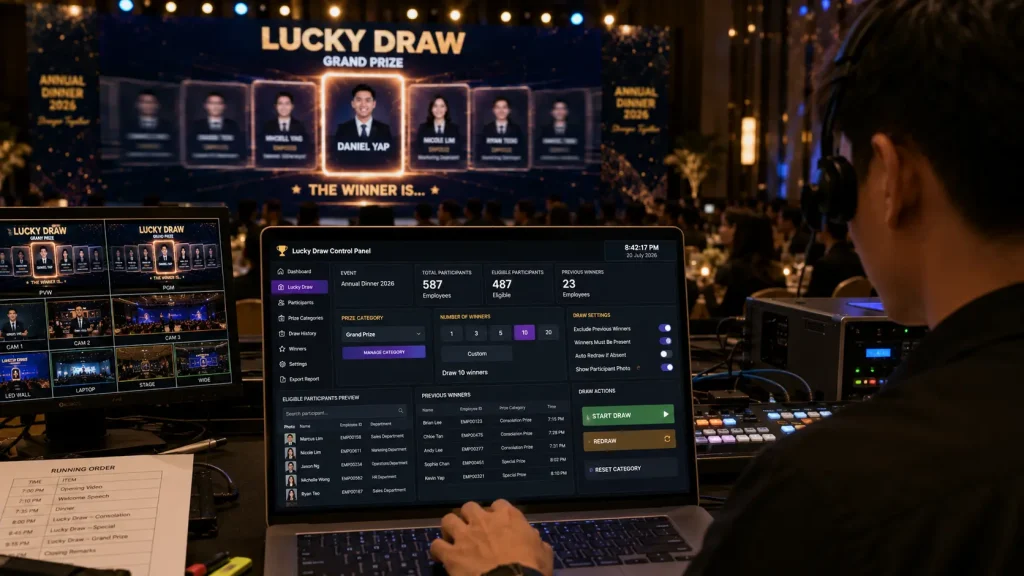
Lucky Draw Control Panel
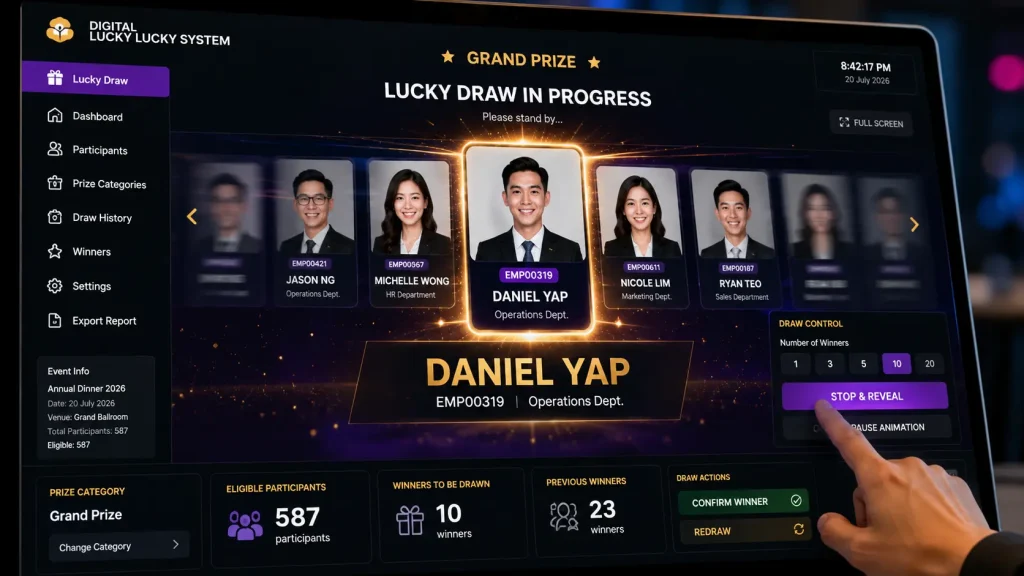
A Digital Lucky Draw System Malaysia can include a separate operator control panel that allows the technical team to manage the lucky draw without displaying backend controls on the main event LED screen.
The operator can manage functions such as:
- Select Prize Category
- Choose Number of Winners
- Start Lucky Draw
- Stop & Reveal Winners
- Confirm Winner
- Redraw Winner
- View Eligible Participants
- View Previous Winners
- Exclude Selected Participants
- Manage Prize Status
- Export Winner Records
This creates two separate views: a clean presentation interface for the audience and a practical control interface for the event operator.
Hardware Setup for Digital Lucky Draw
The lucky draw system can work with an event’s existing LED screen, projection screen or other large-format display.
A typical setup may include:
- Lucky Draw Laptop or Mini PC
- Operator Control Laptop
- Main LED Screen
- LED Video Processor
- HDMI or DisplayPort Connection
- Local Network Router where required
- Physical Trigger Button where required
- Touchscreen Control Panel where required
- Backup Participant Database
For many corporate events, the main LED screen and AV infrastructure are already provided by the event production team. In this situation, the lucky draw system can provide the required visual output to the existing screen setup.
The final output resolution should be confirmed before the event so the lucky draw interface can be prepared according to the actual LED screen dimensions and aspect ratio.
Custom Lucky Draw Themes & Animation
A digital lucky draw does not need to look like a generic random name generator.
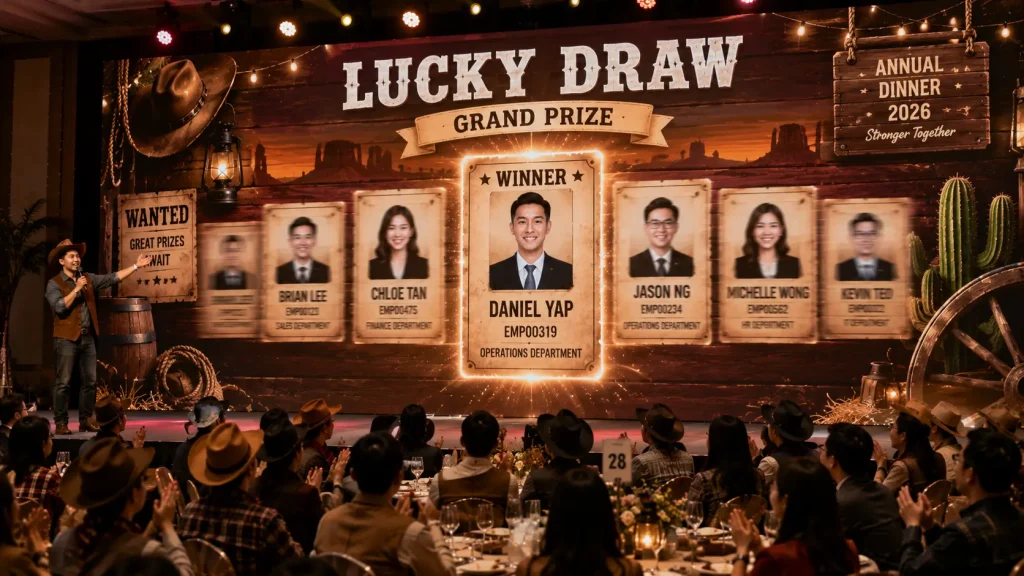
The entire experience can be customised according to the company’s event theme, visual identity and programme direction.
Customisation can include:
- Event Theme
- Company Colours
- Background Graphics
- Prize Category Designs
- Participant Cards
- Animated Name Selection
- Countdown Sequences
- Winner Reveal Animations
- Celebration Effects
- Sound Effects
- Custom Transitions
- Grand Prize Animation
For example, a western-themed annual dinner could use a cowboy-inspired lucky draw interface, while a futuristic technology event could use a cleaner digital visual direction.
The objective is to make the lucky draw feel integrated with the event rather than appearing as unrelated software displayed on the screen.
Using Employee Photos in the Lucky Draw
Employee photographs can be incorporated into the lucky draw interface when suitable participant images are available.
Instead of displaying only names or staff IDs, participant cards can include:
- Employee Photograph
- Employee Name
- Employee ID
- Department
- Team or Business Unit
During the selection animation, employee photographs can cycle across the screen before the final winner is revealed.
This can make an annual dinner lucky draw more engaging because colleagues can immediately recognise the selected employee from across the ballroom.
VIP Lucky Draw Trigger
For important prize categories, a VIP or senior management representative can be invited on stage to activate the lucky draw.
Instead of asking the VIP to operate a laptop, a dedicated physical button or touchscreen interface can be positioned on stage.
A typical VIP lucky draw sequence could be:
- Emcee invites VIP onto the stage
- Prize category appears on the main LED screen
- VIP places a hand on the trigger button
- Emcee begins the countdown
- VIP presses the button
- Lucky draw animation starts
- Winner is randomly selected
- Winner appears on the main LED screen
- Winner comes forward to receive the prize
This creates a stronger stage moment while keeping the actual lucky draw software controlled by the technical operator.
Winner Management
For events with many prize categories, winner management becomes an important part of the system.
Once a winner has been selected, the operator can confirm the result before the participant is permanently recorded as a winner.
The winner database can contain:
- Winner Name
- Employee ID
- Department
- Prize Category
- Prize Name
- Draw Time
- Winner Status
Confirmed winners can automatically be removed from subsequent draws if duplicate winners are not permitted.
The winner history also allows the operator to review previous results during the event without relying on handwritten records.
What If the Winner Is Not Present?
Corporate events may require the winner to be physically present in the ballroom to claim a prize.
If the selected participant does not respond within the organiser’s specified time, the operator can mark the result accordingly and perform another draw.
A redraw workflow can include:
- Winner is selected
- Emcee announces the winner
- Event team checks whether the participant is present
- Winner is confirmed if present
- Redraw is activated if required
- Replacement winner is selected
The exact redraw rules should be confirmed before the event so the emcee, organiser and technical operator follow the same procedure.
Can the Lucky Draw Work Offline?
Yes. Many event lucky draw systems can be configured to operate locally without relying on continuous internet access.
If the final participant database is prepared before the lucky draw begins, the selection software can run directly from the event computer and display the results on the main LED screen.
This can reduce dependence on venue Wi-Fi during an important live programme segment.
However, internet connectivity may still be required when the lucky draw needs to receive real-time participant information from an online QR registration platform or cloud database.
For this reason, the required system architecture should be confirmed according to the registration workflow before the event.
Connecting Multiple Lucky Draw Screens
Some events use more than one display, such as a main ballroom LED screen together with secondary screens around the venue.
Where the AV setup supports distributed video output, the same lucky draw visual can be displayed simultaneously across multiple screens.
This allows guests in different areas of the ballroom or venue to follow the same winner selection in real time.
The final configuration depends on the venue’s AV distribution system, screen resolutions and technical setup.
Planning the Lucky Draw Event Flow
A successful lucky draw depends on both the software and the programme flow.
Before the event, organisers should confirm:
- Final Participant Database
- Lucky Draw Eligibility Rules
- Number of Prize Categories
- Number of Winners per Category
- Whether Previous Winners Can Win Again
- Whether Winners Must Be Present
- Redraw Rules
- Employee Information to Display
- Whether Employee Photos Are Required
- VIP Trigger Requirements
- LED Screen Resolution
- Lucky Draw Schedule
- Winner Confirmation Procedure
These rules should be finalised before the system is tested so the software configuration matches the actual event programme.
Digital Lucky Draw for Different Event Sizes
A Digital Lucky Draw System Malaysia can be adapted for both smaller corporate gatherings and large annual dinners.
For example:
- 100–200 Guests — Simple participant database with single or multiple winner draws
- 300–600 Guests — Multiple prize categories, winner history and QR registration integration
- 600–1,000+ Guests — Larger participant database, multiple winner batches and structured prize management
The number of participants does not necessarily make the audience interface more complicated. The system manages the participant pool in the background while the audience sees a simple and visually engaging lucky draw experience.
Why Choose MyDigital Asia?
MyDigital Asia develops customised Digital Lucky Draw System Malaysia solutions for annual dinners, corporate events, conferences, product launches and company celebrations.
Our solutions can include:
- Custom Digital Lucky Draw Software
- Big Screen Lucky Draw Interface
- Single & Multiple Winner Draws
- Previous Winner Exclusion
- Prize Category Management
- Employee Photo Integration
- QR Registration Integration
- Participant Database Management
- VIP Trigger Button
- Custom Event Theme & Branding
- Winner History & Export
- LED Screen Integration
- Lucky Draw Hardware Setup
- On-site Technical Operation
Frequently Asked Questions
What is a Digital Lucky Draw System?
A Digital Lucky Draw System is software that randomly selects winners from an approved participant database and displays the selection process and results digitally on an event screen.
Can the lucky draw select multiple winners at once?
Yes. The system can be configured to select one or multiple winners in each round, including batches such as five or ten winners where required.
Can previous winners be automatically excluded?
Yes. Once a winner is confirmed, the participant can automatically be removed from future draws if the event rules allow each person to win only once.
Can the lucky draw connect with QR registration?
Yes. Participant information collected through a QR registration or event check-in system can be connected with the lucky draw database according to the required eligibility rules.
Can we display employee photos?
Yes. Employee photographs can be displayed together with names, employee IDs and departments when suitable images are provided and included in the participant database.
Can a VIP press a physical button to start the lucky draw?
Yes. A physical trigger button or touchscreen can be integrated so a VIP can activate the lucky draw during the stage programme.
Can the system work without internet?
Yes. A locally prepared lucky draw database and application can operate without continuous internet access. Internet may still be required when real-time data needs to be synchronised with an online registration platform.
Can the same lucky draw appear on multiple screens?
Yes. Where the event AV system supports multiple or distributed outputs, the same lucky draw content can be shown across the main LED screen and additional venue displays.
Can the lucky draw match our annual dinner theme?
Yes. The interface, backgrounds, animations, participant cards, winner screens and other visual elements can be customised according to the event theme and company branding.
What happens if a selected winner is not present?
The operator can perform a redraw according to the organiser’s predefined rules. Winner confirmation and redraw procedures should be agreed before the event.
Related Articles
- Interactive Event Technology Malaysia
- Interactive Event Ideas Malaysia
- Big Screen Interactive Games Malaysia
- QR Event Registration System Malaysia
- Interactive Games Malaysia
- Interactive Touchscreen Games
- Interactive Annual Dinner Technology
Make Your Next Lucky Draw Part of the Show
A Digital Lucky Draw System Malaysia turns winner selection into a live big-screen experience while simplifying participant management, prize categories and previous winner exclusion behind the scenes.
MyDigital Asia provides customised lucky draw software, QR registration integration, participant database management, themed big-screen interfaces, physical trigger buttons, LED screen integration and on-site technical support for corporate events across Malaysia.
Contact MyDigital Asia today to discuss a customised Digital Lucky Draw System for your next annual dinner or corporate event.
Request a Free Consultation
Looking for Interactive Maps, Interactive Solutions or Event Technology?

LATEST POSTS