
Interactive Annual Dinner Technology
Interactive Annual Dinner Technology can transform a traditional corporate dinner into a more engaging event experience by connecting digital registration, big-screen content, interactive games, lucky draws and stage activities throughout the programme.
Instead of treating technology as separate equipment around the ballroom, a stronger approach is to plan the entire guest journey from arrival until the final prize presentation.
Guests might register through QR codes at the entrance, participate in interactive activities before dinner, watch a cinematic opening sequence, compete in big-screen games during the programme and join a digital lucky draw connected to the same participant database.
Key Takeaways
- Create a connected digital experience from guest arrival to the final programme.
- Use QR registration to simplify guest management.
- Turn the main LED screen into an interactive entertainment platform.
- Engage large audiences through big-screen games.
- Connect participant databases with digital lucky draws.
- Customise technology according to the annual dinner theme.
What Is Interactive Annual Dinner Technology?
Interactive annual dinner technology refers to digital systems and experiences designed to increase participation during corporate dinners, gala nights, employee appreciation events and company celebrations.
Depending on the event concept, this can include:
- QR Event Registration
- Digital Guest Check-In
- Interactive Welcome Screens
- Opening Cinematic Content
- Interactive Stage Gimmicks
- Big Screen Interactive Games
- Touchscreen Games
- Audience Participation Games
- Digital Lucky Draw Systems
- Best Dress Voting
- Live Social Walls
- Digital Award Presentations
- Photo & AI Experiences
The objective is not necessarily to use every technology available.
The most effective annual dinner experience selects a few suitable interactions and integrates them naturally into the event programme.
Planning the Complete Annual Dinner Guest Journey
An annual dinner normally lasts several hours, but the guest experience begins before the ballroom programme officially starts.
Technology can therefore be planned around different stages of the event.
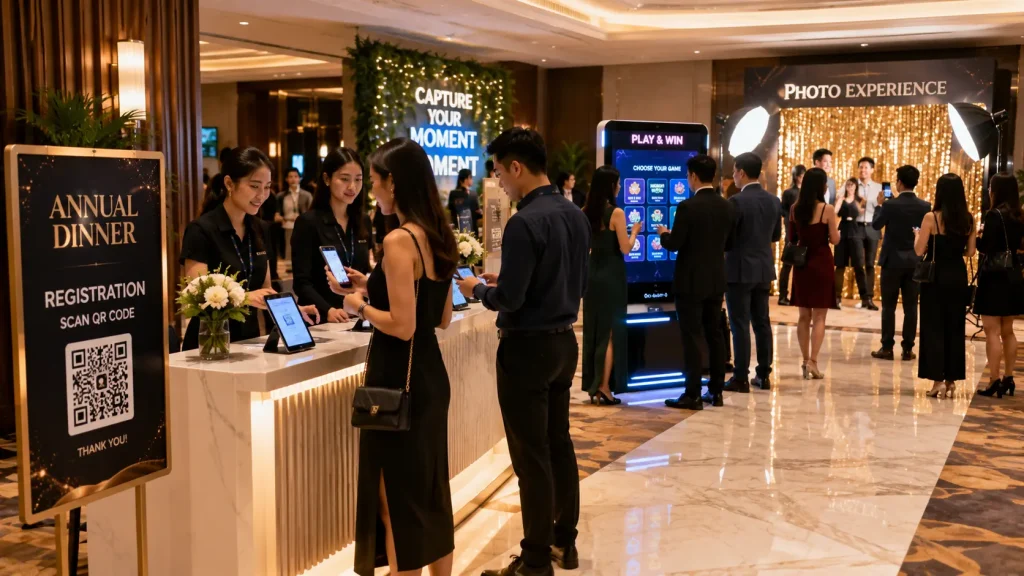
Stage 1 — Arrival & Registration
Guests arrive at the venue and complete registration or check-in.
A QR-based registration system can help event staff identify participants, provide table information and manage attendance where required.
The registration database can later be connected with lucky draws and selected interactive activities.
Stage 2 — Foyer Engagement
Before the ballroom doors open, guests may spend time in the foyer meeting colleagues and waiting for the programme to begin.
This creates an opportunity for interactive activities such as:
- AI Photobooth
- 360 Video Booth
- Interactive Touchscreen Games
- Reaction Games
- Photo Activations
- Live Social Wall
- Digital Message Wall
These activities can help distribute guests throughout the foyer instead of creating one large waiting area around the registration counters.
Stage 3 — Ballroom Opening
Once guests enter the ballroom, the main LED screen becomes an important part of the event experience.
Instead of beginning with a static company logo, the programme can open with cinematic motion graphics, a company milestone video or a customised visual sequence designed around the annual dinner theme.
The opening content can transition directly into the emcee introduction, management entrance or opening gimmick.
Stage 4 — Interactive Programme
Interactive games can be inserted between speeches, dinner courses, performances and award presentations to keep guests engaged throughout the programme.
The main LED screen can become the centre of the activity while selected participants compete from the stage or the entire audience participates from their seats.
Stage 5 — Lucky Draw & Awards
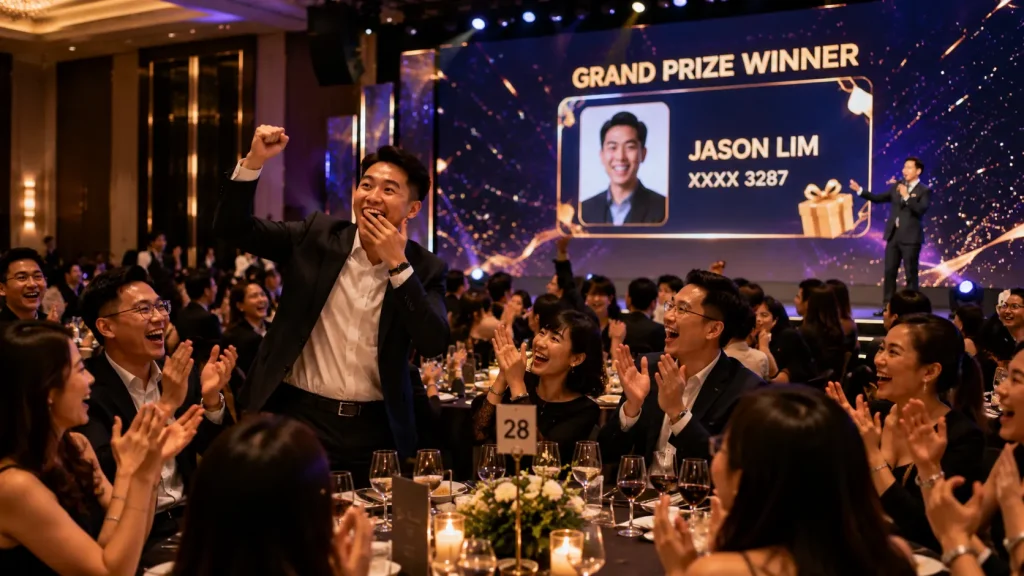
Lucky draws are often one of the most anticipated parts of a corporate annual dinner.
A customised digital lucky draw system can select winners from an approved participant database while the selection animation and winner information appear on the main LED screen.
Awards can also use customised motion graphics, winner screens and presentation sequences so the visual experience remains consistent throughout the event.
QR Registration for Annual Dinners
Large corporate annual dinners may involve hundreds or even thousands of employees arriving within a relatively short period.
A QR Event Registration System can help organise this process by allowing participants to present individual QR codes or complete registration through a digital form.
Depending on the event requirements, the system can manage:
- Employee Name
- Employee ID
- Department
- Table Number
- Guest Category
- Registration Status
- Attendance Status
- Lucky Draw Eligibility
Multiple registration counters can access the same participant database, helping reduce queues during peak arrival periods.
For events that do not require formal attendance tracking, a simpler QR registration form can also be used to collect participant information for lucky draw eligibility or other activities.
Big Screen Interactive Games for Annual Dinners
The main LED screen does not need to remain a passive background throughout the evening.
Interactive Annual Dinner Technology can turn the screen into a shared entertainment platform for hundreds of guests.
Possible big-screen activities include:
- Live Quiz Competition
- Audience Voting
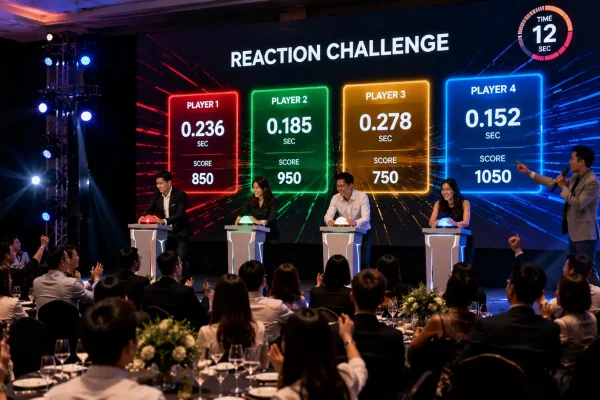
- Reaction Challenge
- Digital Racing Game
- Team Competition
- Photo-based Games
- Random Participant Selection
- Spin & Win
- Countdown Challenges
Some activities can invite a small number of employees onto the stage, while others can allow larger groups of guests to participate simultaneously using smartphones or other interaction methods.
Using Employee Photos in Big Screen Games
Employee photographs can create highly personalised annual dinner games.
For example, participant photos can be loaded into a digital racing game where several employees are randomly selected and their faces appear on animated characters, vehicles or other themed game elements.
The race then takes place on the main LED screen while the entire ballroom watches.
Because colleagues recognise the participants, even a simple game mechanic can become entertaining for a large audience.
The same concept can be adapted according to the annual dinner theme, such as:
- Horse Racing
- Car Racing
- Running Race
- Space Race
- Boat Race
- Theme-specific Character Race
Audience Participation from Smartphones
For larger events, participation does not always need to be limited to employees standing on stage.
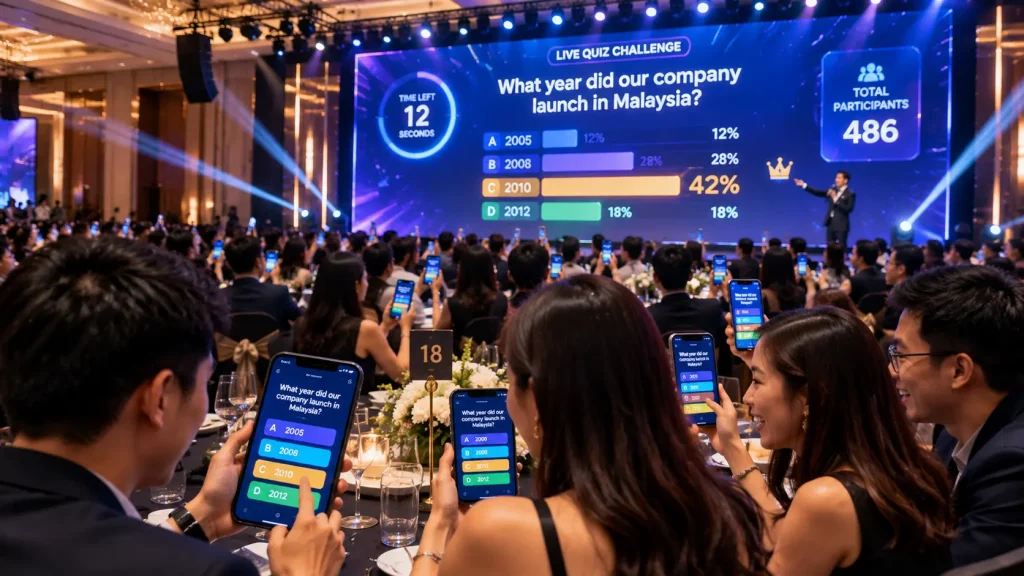
Selected interactive experiences can allow guests to join through their smartphones by scanning an event QR code.
Depending on the game concept, guests may be able to:
- Answer Quiz Questions
- Submit Votes
- Select Options
- Send Reactions
- Participate in Team Challenges
- Contribute to Live Results
The aggregated results can then appear on the main LED screen in real time, creating an activity that involves a much larger portion of the ballroom.
The final technical configuration depends on the expected number of simultaneous participants, venue connectivity and game requirements.
Digital Lucky Draw for Annual Dinners
A digital lucky draw can turn winner selection into part of the evening’s entertainment rather than simply displaying a randomly selected employee name.
The system can support:
- Single Winner Draw
- Multiple Winners
- Different Prize Categories
- Employee Photos
- Previous Winner Exclusion
- Winner History
- Redraw Function
- Custom Winner Animations
- VIP Trigger Button
For smaller prizes, several winners can be selected simultaneously to keep the programme moving efficiently.
Premium prizes can use longer animations and individual winner reveals to create more anticipation before the final result.
Matching Technology with the Annual Dinner Theme
Interactive technology works best when it feels like part of the event rather than a collection of unrelated digital activities.
For example, a western-themed annual dinner could carry the same visual direction across:
- QR Registration Interface
- Welcome Screen
- Opening Animation
- Big Screen Racing Game
- Lucky Draw Interface
- Award Screens
A futuristic event might instead use cleaner motion graphics, digital interfaces and technology-inspired game mechanics.
Maintaining a consistent visual direction helps connect individual activities into one overall annual dinner experience.
Opening Cinematic & Interactive Gimmick
The opening sequence sets the tone for the entire annual dinner. Instead of beginning with a static welcome screen, companies can use customised cinematic content and an interactive stage gimmick to create a stronger opening moment.
A typical opening sequence can combine:
- Annual Dinner Opening Cinematic
- Company Milestone Animation
- Corporate Storytelling
- Event Theme Animation
- LED Screen Motion Graphics
- Lighting Synchronisation
- Sound Effects
- Management Entrance
- Physical Trigger Button
- Touchscreen Launch Gimmick
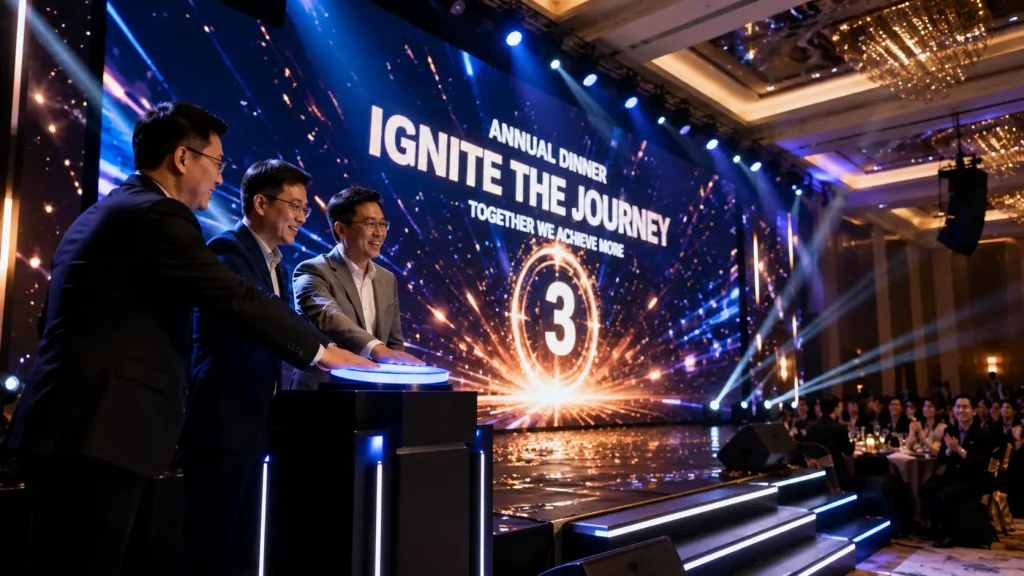
For example, senior management can be invited onto the stage to activate a physical button. Once triggered, the main LED screen begins an animated countdown before transitioning into the annual dinner opening visual.
The objective is to connect the content, stage action, lighting and audio into one coordinated moment rather than treating the opening video as a standalone presentation.
Big Screen Game Formats
The main LED screen can become one of the most effective engagement tools during a corporate annual dinner because the entire ballroom can follow the activity simultaneously.
Different Interactive Annual Dinner Technology concepts can be selected according to the audience size, event theme and available programme duration.
Digital Racing Game
Several employees can be selected and placed into a customised animated race. Participant names, employee photos or character avatars can appear on the main LED screen while the audience watches the competition.
Live Quiz Competition
Participants answer questions related to company knowledge, annual dinner themes or general entertainment. The system can calculate scores and display rankings or winners on the main screen.
Reaction Challenge
Selected participants compete to react as quickly as possible using physical buttons, touchscreens or other configured input devices while their results appear on the LED screen.
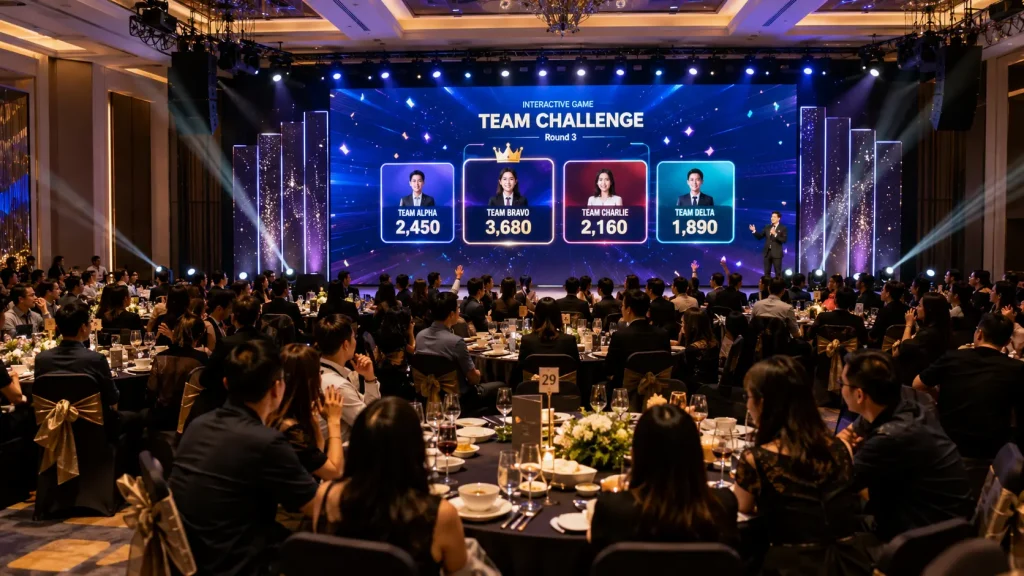
Team Challenge
Employees can be divided into departments, tables or teams and compete through a customised game. Live scores can be displayed throughout the activity to encourage audience support.
Spin & Win
A customised digital prize wheel can be activated from the stage, allowing selected guests or VIPs to spin for prizes while the result appears on the main screen.
Live Social Wall
A Live Social Wall can turn guest-generated content into part of the annual dinner visual experience.
Depending on the selected workflow, guests can submit photographs, messages or other approved content which can then appear within a customised display on event screens.
A social wall can be used during:
- Guest Arrival
- Pre-event Foyer Activities
- Dinner Breaks
- Performance Transitions
- Photo Sessions
- End-of-event Celebrations
Content moderation can be incorporated where required so organisers can review submissions before they are displayed publicly.
Where the event has screens in both the foyer and ballroom, the same approved content can also be distributed across multiple displays when supported by the event’s AV and network configuration.
Best Dress Voting
Best Dress competitions are common at themed annual dinners and can be enhanced through a digital voting experience.
Finalists can be displayed on the main LED screen with participant numbers, names or photographs before voting begins.
Depending on the event format, voting can be carried out by:
- Audience Smartphone Voting
- Judges’ Touchscreen Voting
- Management Voting
- Combined Judge & Audience Voting
Once voting closes, the system can calculate the results and display the winning participants through an animated reveal on the main screen.
Voting rules should be configured according to the organiser’s requirements, including whether each guest can vote once and how audience and judge scores are weighted.
Interactive Award Presentations
Award presentations can also be integrated into the annual dinner’s digital visual system.
Instead of using one static background for every award, customised screens can be prepared for different award categories and recipients.
Digital award content can include:
- Award Category Animation
- Nominee Presentation
- Winner Reveal
- Employee Photograph
- Employee Name & Department
- Years of Service
- Achievement Highlights
- Presentation Background
- Group Award Screen
For long service awards involving many employees, the content can be organised into groups or service-year categories so the presentation remains clear and efficient.
AI Photobooth & Digital Photo Experiences
Interactive annual dinner technology does not need to be limited to activities inside the ballroom.
AI photobooths and other digital photo experiences can be positioned in the foyer to engage guests before the programme begins.
Depending on the concept, participants can take a photograph and receive a themed transformation based on the annual dinner creative direction.
For example, a photo experience could transform guests into:
- Western Characters
- Movie-inspired Characters
- Futuristic Portraits
- Fantasy Characters
- Retro-themed Portraits
- Custom Corporate Campaign Styles
The final visual direction can be customised according to the event theme while maintaining an appropriate corporate presentation.
Hardware & Technical Setup
An Interactive Annual Dinner Technology setup can use the event’s existing AV infrastructure together with additional interactive hardware where required.
Depending on the selected experiences, the technical setup may include:
- Main LED Screen
- LED Video Processor
- Playback Laptop
- Interactive Game Computer
- Lucky Draw Computer
- Operator Control Laptop
- Touchscreen Displays
- Physical Trigger Buttons
- QR Scanning Devices
- Registration Tablets
- Local Network Router
- Dedicated Internet Connection
- Audio Connection to Event Sound System
Where the venue or event production company already provides the LED screen, audio and lighting systems, interactive content can be integrated with the existing production setup instead of duplicating equipment unnecessarily.
Connecting Interactive Content with the Event AV System
Interactive applications normally generate a visual output that can be routed to the event’s LED processor or video switching system.
This allows the production team to switch between:
- Welcome Screen
- Opening Video
- Presentation Slides
- Live Camera Feed
- Interactive Games
- Lucky Draw
- Award Screens
- Closing Content
Audio from games, videos and lucky draw sequences can also be connected to the main event sound system so sound effects are heard throughout the ballroom.
Technical testing should be completed before guests arrive to confirm screen resolution, video output, audio levels and switching procedures.
Planning for 300 Guests
For an annual dinner of approximately 300 guests, a relatively simple technology setup can already create a strong interactive experience.
A possible combination could include:
- QR Registration
- 1 Foyer Interactive Activity
- Opening Cinematic
- 1 Big Screen Interactive Game
- Digital Lucky Draw
- Digital Award Screens
This provides several engagement moments without making the programme overly complicated.
Planning for 600 Guests
For an event with approximately 600 participants, guest flow and programme timing become more important.
A possible setup could include:
- Multiple QR Registration Counters
- 2–3 Foyer Engagement Activities
- Opening Cinematic & Stage Gimmick
- Big Screen Employee Racing Game
- Audience Quiz or Voting
- Best Dress Digital Voting
- Digital Lucky Draw
- Custom Award Screens
Registration, games and lucky draw can also share participant information where suitable, reducing the need to maintain several separate databases.
Planning for 1,000+ Guests
For large annual dinners with 1,000 or more guests, technology should be designed around scalability and operational reliability.
Planning considerations may include:
- Multiple Registration Zones
- Higher Participant Throughput
- Dedicated Event Network
- Multiple Interactive Stations
- Large Participant Database
- Audience-wide Participation
- Backup Computers
- Backup Participant Database
- Dedicated Technical Operators
- Clear AV Switching Procedures
For this event size, technical rehearsals and contingency planning become especially important because a small delay can affect a large audience and the overall programme timing.
Integrating Technology into the Run of Show
Interactive technology should be planned together with the event programme rather than added after the run of show has already been finalised.
A simplified annual dinner flow could be:
- 5:30 PM — QR Registration & Foyer Activities
- 6:45 PM — Ballroom Doors Open
- 7:00 PM — Opening Cinematic
- 7:10 PM — Welcome Speech
- 7:30 PM — Dinner & Performance
- 8:00 PM — Big Screen Interactive Game
- 8:30 PM — Awards Presentation
- 9:00 PM — Best Dress Voting
- 9:20 PM — Lucky Draw
- 9:45 PM — Grand Prize Draw
- 10:00 PM — Closing & Group Photo
The actual timing will vary according to the event, but defining interactive segments early allows the technical team, emcee, AV crew and organiser to understand exactly when each system needs to appear.
Rehearsal & Event-day Operation
Interactive systems should be tested together with the actual LED screen, audio system and event programme before the annual dinner begins.
A technical rehearsal can verify:
- LED Screen Resolution
- Game Output
- Lucky Draw Database
- Participant Names & Photos
- Trigger Buttons
- Audio Playback
- Lighting Cues
- AV Switching
- Winner Reveal Sequence
- Emcee Cues
- Redraw Procedure
- Backup System
For interactive stage activities, a short rehearsal with the emcee and relevant stage assistants can also help prevent confusion during the live programme.
Why Choose MyDigital Asia?
MyDigital Asia provides customised Interactive Annual Dinner Technology for corporate dinners, gala nights, employee appreciation events and company celebrations across Malaysia.
Our solutions can include:
- QR Event Registration
- Interactive Foyer Activities
- AI Photobooth Experiences
- Opening Cinematic Content
- Interactive Opening Gimmicks
- Big Screen Interactive Games
- Employee Photo Racing Games
- Audience Participation Systems
- Best Dress Voting
- Live Social Walls
- Digital Lucky Draw Systems
- Digital Award Presentation
- Custom Event UI / UX
- LED Screen Integration
- On-site Technical Operation
Frequently Asked Questions
What is Interactive Annual Dinner Technology?
Interactive Annual Dinner Technology combines digital systems such as QR registration, interactive games, audience participation, lucky draws, voting and customised event content to create a more engaging corporate dinner experience.
Can interactive games use our existing ballroom LED screen?
Yes. In many cases, interactive games can output to the existing LED screen provided by the event AV supplier, subject to compatible resolution, connections and technical configuration.
Can 600 guests participate in an interactive game?
Yes. The suitable method depends on the game concept. Selected participants can compete on stage, while smartphone-based activities can allow a much larger portion of the audience to participate simultaneously.
Can the lucky draw use the same QR registration database?
Yes. Where the systems are configured together, registered or checked-in participants can be transferred into the lucky draw pool according to the organiser’s eligibility rules.
Can employee faces be used in a big-screen game?
Yes. Employee photographs can be incorporated into suitable customised games such as digital racing experiences, subject to the required participant images being prepared before the event.
Can the annual dinner theme be applied to all interactive content?
Yes. Registration interfaces, games, lucky draw screens, opening content and award visuals can share a consistent creative direction based on the event theme.
Can guests vote for Best Dress using their phones?
Yes. Smartphone voting can be configured so guests access a voting interface through a QR code and submit their selected finalist according to the event’s voting rules.
Can the same content appear on foyer and ballroom screens?
Yes. Where the venue’s AV distribution and network setup support it, selected digital content such as a social wall can be synchronised across multiple event screens.
Do interactive annual dinner systems require internet?
Not all systems require continuous internet access. Local games and lucky draws can often operate offline, while smartphone participation, online registration and cloud-based systems normally require reliable connectivity.
How early should interactive technology be planned?
Ideally, interactive requirements should be discussed during the event planning stage so game mechanics, databases, content, screen specifications and programme cues can be developed and tested before the event.
Related Articles
- Interactive Event Technology Malaysia
- Interactive Event Ideas Malaysia
- Big Screen Interactive Games Malaysia
- QR Event Registration System Malaysia
- Digital Lucky Draw System Malaysia
- Interactive Touchscreen Games for Events
- Interactive Games Malaysia
Turn Your Annual Dinner into an Interactive Experience
Interactive Annual Dinner Technology can connect registration, foyer engagement, opening content, big-screen games, audience participation, lucky draws and awards into one coordinated event journey.
MyDigital Asia provides customised interactive event software, QR registration, big-screen games, digital lucky draws, AI photo experiences, opening content, voting systems and on-site technical integration for corporate annual dinners across Malaysia.
Contact MyDigital Asia today to discuss the interactive technology for your next corporate annual dinner.
Request a Free Consultation
Looking for Interactive Maps, Interactive Solutions or Event Technology?

LATEST POSTS