
10 Physical-Digital Interactive Experience Ideas for Brands & Visitor Spaces
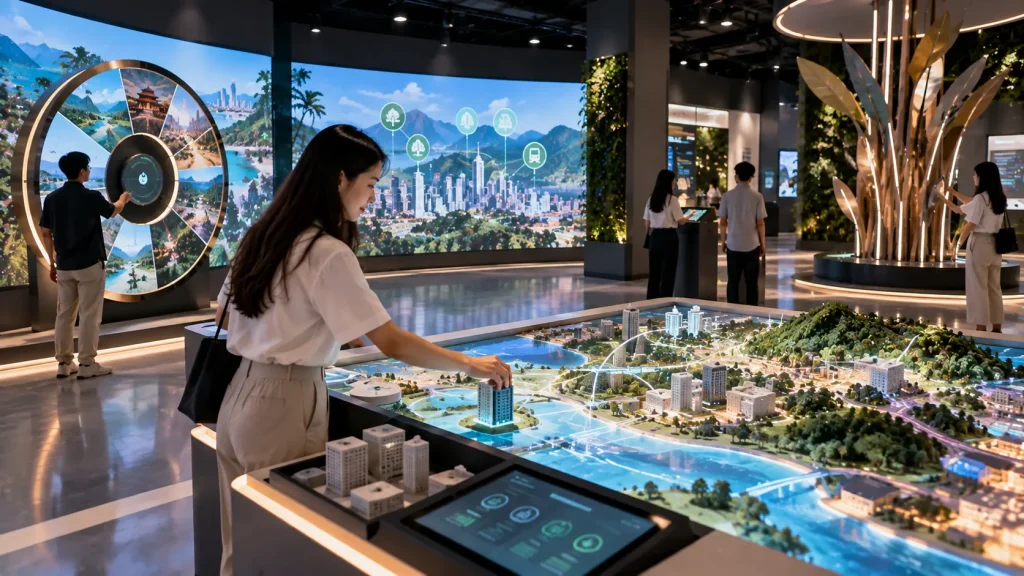
A physical digital interactive experience connects something visitors can physically touch, move, build or control with a digital response.
Instead of interacting only through a touchscreen, visitors might rotate a wheel, move a model, place an object, adjust a physical control or create something by hand. The system detects that action and responds through animation, projection, LED visuals, lighting, sound or real-time data.
This combination can make digital content feel more tangible and memorable, especially when the physical interaction helps explain a product, process or story.
Here are 10 physical-digital interactive experience ideas for brands, exhibitions, visitor centres, museums, showrooms and permanent installations.
1. Turn the Story Wheel
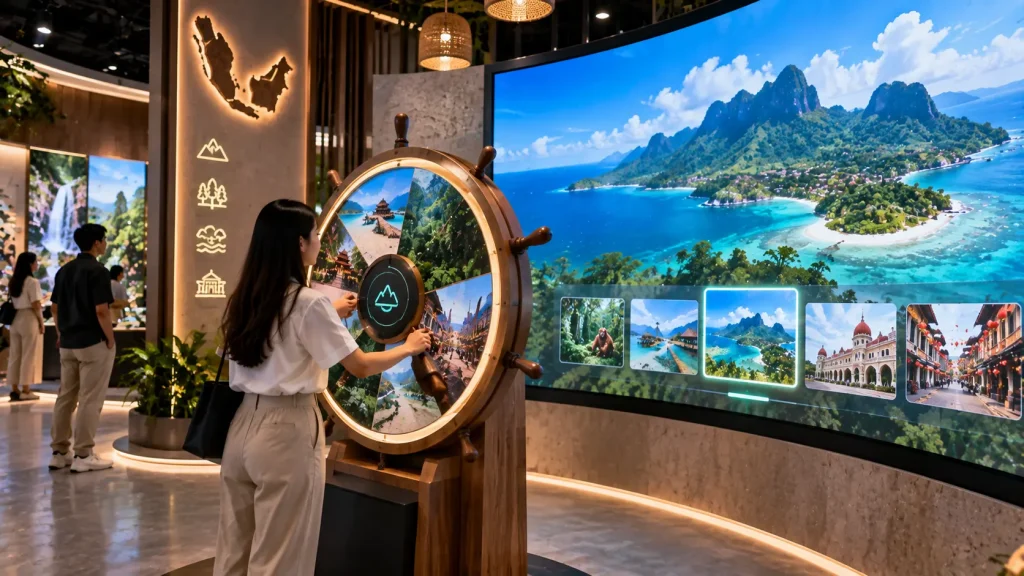
A large physical wheel can become a simple but satisfying way to explore digital content.
Instead of selecting chapters from a touchscreen menu, visitors physically rotate the wheel. As it moves, the digital environment changes with it.
A tourism experience could rotate between different destinations. A corporate gallery could move through different eras of the company’s history. A science centre could use the wheel to travel through geological periods, seasons or stages of a process.
The wheel can include tactile stopping points so visitors physically feel when they have reached a new chapter.
How it works:
A rotary encoder or position sensor measures the wheel’s rotation. Interactive software converts its position into different digital scenes, animations, lighting states or audio content.
Best for:
Visitor centres, museums, tourism galleries, corporate experience centres and educational installations.
2. Build & Scan Creation Station
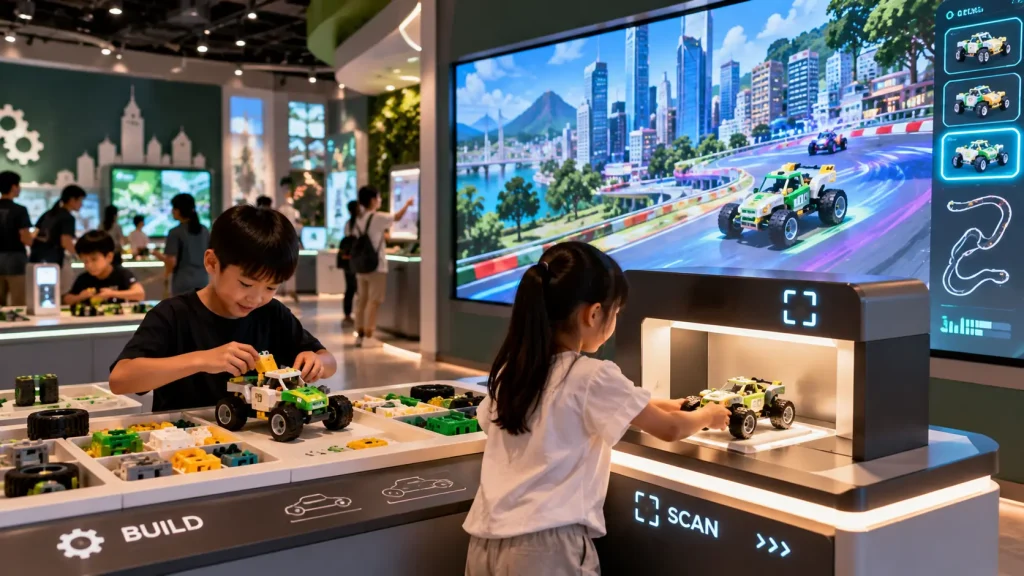
Visitors first create something physically, then watch their creation become digital.
For example, children could assemble a vehicle from modular pieces. Once completed, the model is placed inside a scanning area where the system recognises selected colours, shapes or components.
The finished creation could then appear on a larger display, where it drives through a digital world or joins creations made by other visitors.
The same principle can be adapted beyond children’s experiences. Visitors could assemble packaging, product combinations, characters, structures or other physical designs before seeing the digital result.
How it works:
A camera, scanner, tagged components or object-recognition system identifies the completed creation. Software reconstructs or matches it to digital content and launches the corresponding experience.
Best for:
Children’s attractions, museums, education centres, family exhibitions and creative brand experiences.
3. Place-to-Explore Physical Map
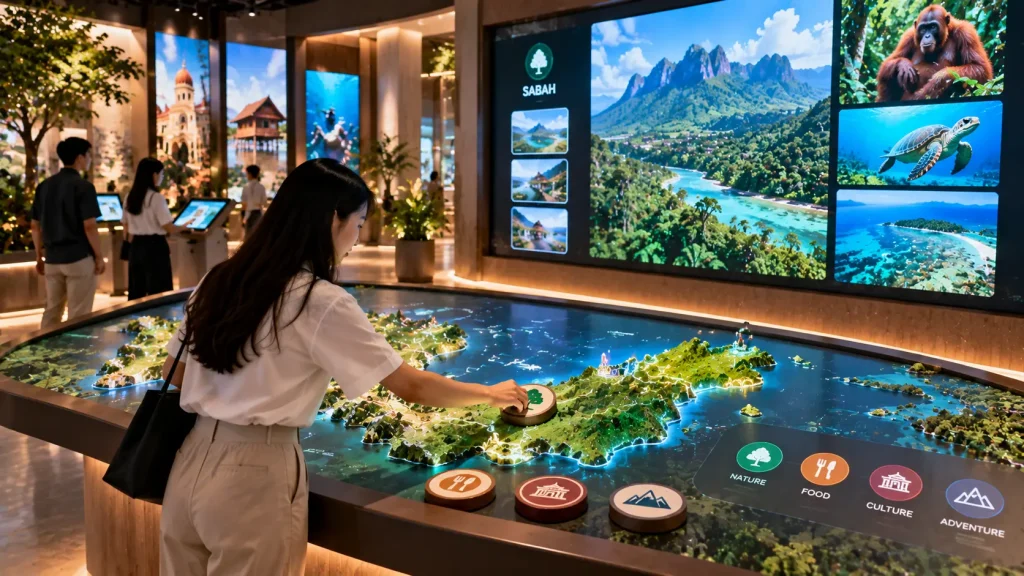
A physical map can become interactive without covering it with buttons or screens.
Visitors receive physical tokens representing different themes such as food, nature, culture or transportation. Placing a token on a location activates related content on the map or a nearby display.
For example, placing a “Nature” token over Sabah could reveal rainforest content, wildlife and recommended destinations. A “Food” token could reveal a completely different layer of information.
This allows the same physical map to support multiple ways of exploring a destination or subject.
How it works:
RFID, NFC, magnetic sensing or object recognition identifies the token and its selected position. The software combines both inputs to determine which content should appear.
Best for:
Tourism centres, property galleries, museums, government galleries and destination experiences.
4. Product X-Ray Station
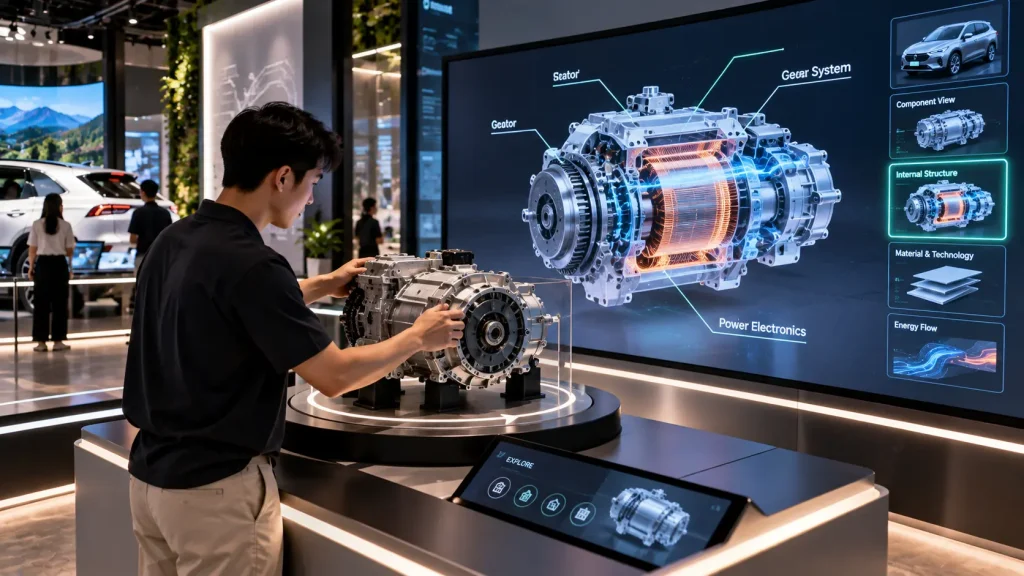
A Product X-Ray Station allows visitors to explore what is normally hidden inside a real product.
A physical automotive component, electronic device, industrial part or medical product can be placed in a designated inspection area. A nearby screen then reveals its internal structure, material layers or operating principles.
If the physical product is rotated, the digital model could rotate with it. Visitors can therefore examine the real object while simultaneously understanding what is happening inside.
This is particularly useful when a product’s value comes from engineering or technology that cannot be seen from the exterior.
How it works:
Object tracking, position sensing or a controlled physical mount identifies the orientation of the real product. A synchronised 3D model or animation displays the corresponding internal view.
Best for:
Automotive showrooms, manufacturing exhibitions, engineering galleries, medical technology and product launches.
5. Physical Timeline Slider
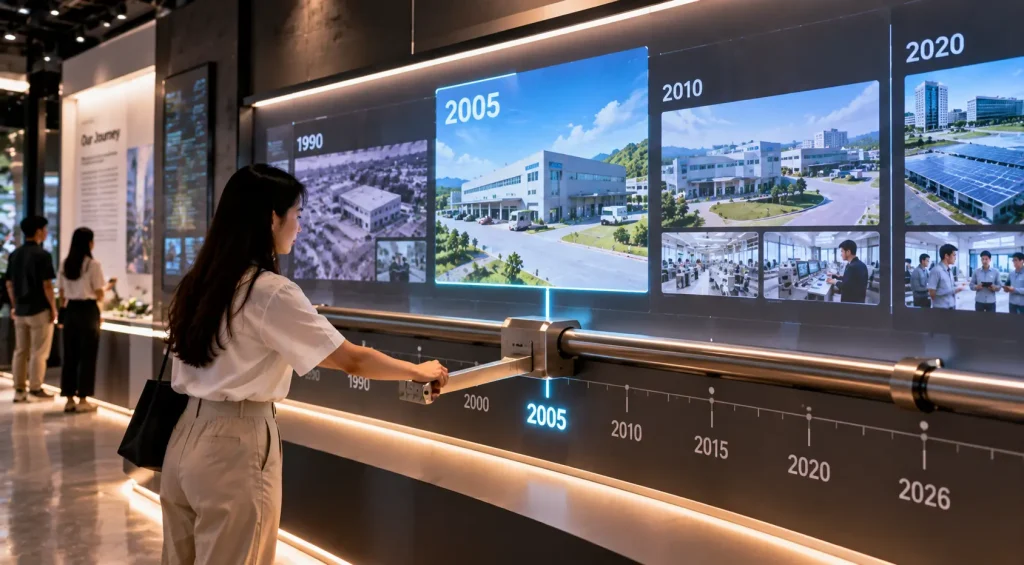
A long physical slider can turn a conventional history timeline into something visitors actively explore.
Instead of tapping dates on a screen, the visitor pushes a handle along a rail marked with different years.
Moving the slider to 1995 could reveal archive photography and the company’s first facility. Moving towards 2010 could transform the content into expansion milestones, while the final position reveals the organisation today.
The movement between years can also be continuous, allowing images, maps, products or environments to gradually transform as the slider travels.
How it works:
A linear position sensor or encoder continuously measures the slider position. The software maps that position to a timeline and updates the corresponding media in real time.
Best for:
Corporate heritage galleries, museums, visitor centres, brand museums and permanent exhibitions.
6. Mix Your Formula
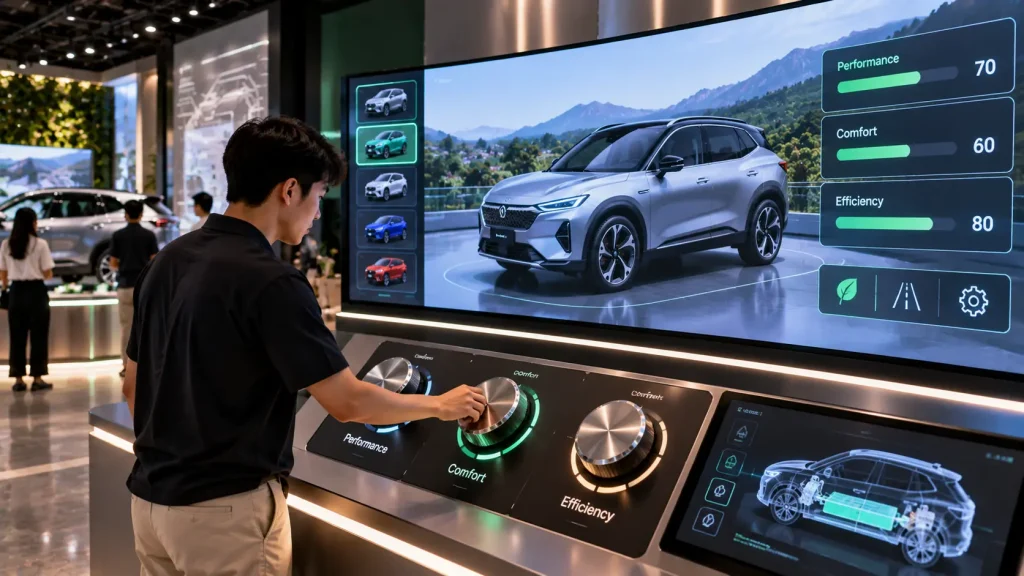
Physical knobs, dials and levers can make product configuration feel more like experimentation than filling in a digital form.
Imagine three physical controls labelled Performance, Comfort and Efficiency. As the visitor adjusts each control, the product on the main display changes in real time.
The same interaction can work for many industries. A skincare experience might adjust hydration, texture and protection. A property gallery might balance connectivity, greenery and lifestyle. A food experience could explore flavour, intensity and ingredients.
The controls give visitors an immediate physical connection to otherwise abstract product attributes.
How it works:
Rotary encoders, potentiometers, switches or levers send continuous input values to the interactive software. These values modify the digital result in real time.
Best for:
Product launches, automotive experiences, FMCG brands, property galleries, showrooms and exhibitions.
7. Build a Digital City
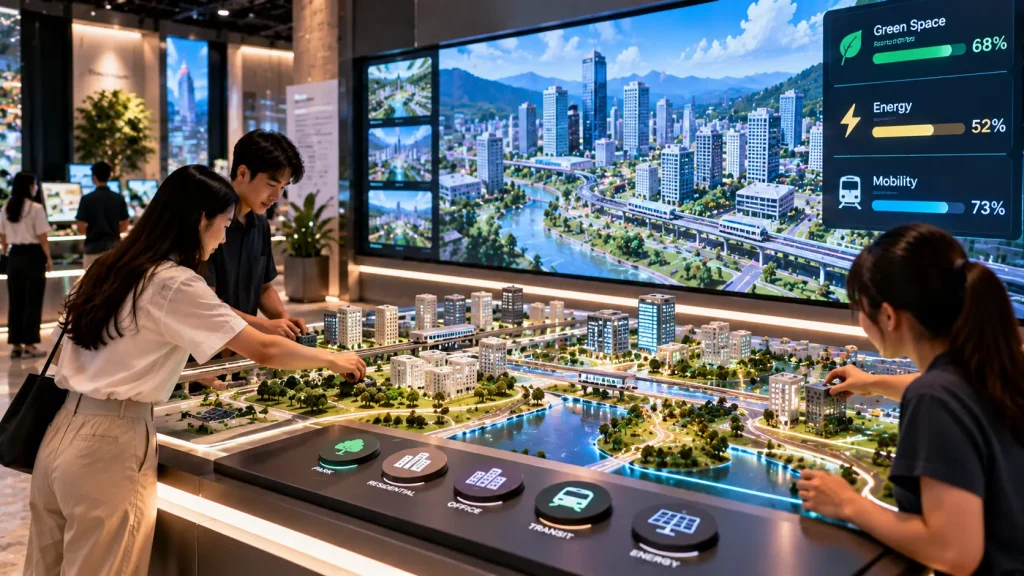
Visitors can physically construct a miniature city and watch the digital environment respond to their decisions.
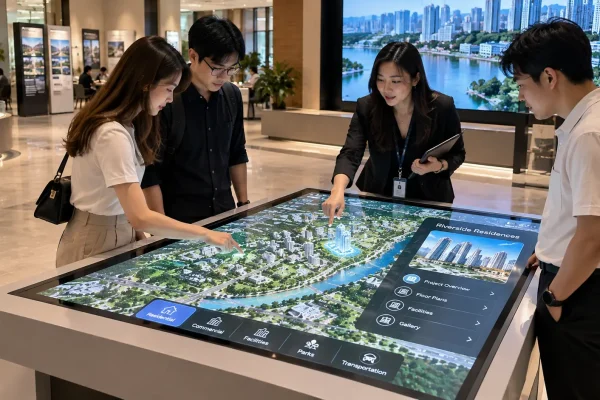
A table could contain modular buildings, parks, solar facilities, transport hubs and residential blocks. Visitors place these physical pieces onto different locations to design their own city.
A larger display then visualises the result while indicators such as energy use, mobility, green space or population change according to what has been built.
Instead of simply explaining smart-city concepts through a video, visitors can experiment with different decisions and see their consequences.
How it works:
Tagged physical modules and sensing zones identify which objects have been placed and where. Interactive software uses the combination to generate the corresponding digital city and data.
Best for:
Property developers, smart-city exhibitions, government galleries, sustainability centres and educational experiences.
8. Mechanical Energy Machine
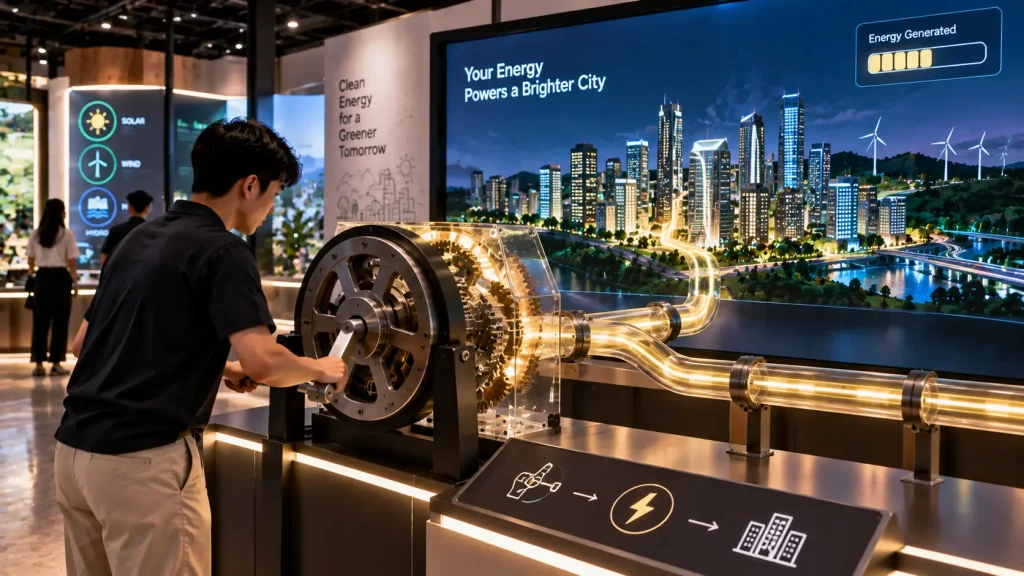
A crank, lever or other mechanical control can make an invisible process such as energy generation physically understandable.
The visitor begins turning a large hand crank. As it rotates, a digital energy meter increases, LED lighting travels through a physical structure and machinery on the main display gradually starts operating.
With enough input, the visitor might power an entire digital factory, illuminate a city or complete an energy journey.
The physical resistance of the mechanism can help communicate that producing energy requires effort, making the interaction particularly useful for science and sustainability storytelling.
How it works:
Rotation or movement sensors measure the physical input. The software converts speed, distance or accumulated movement into digital progress, lighting and audiovisual responses.
Best for:
Energy companies, science centres, engineering exhibitions, sustainability galleries and educational installations.
9. Scan Your Creation
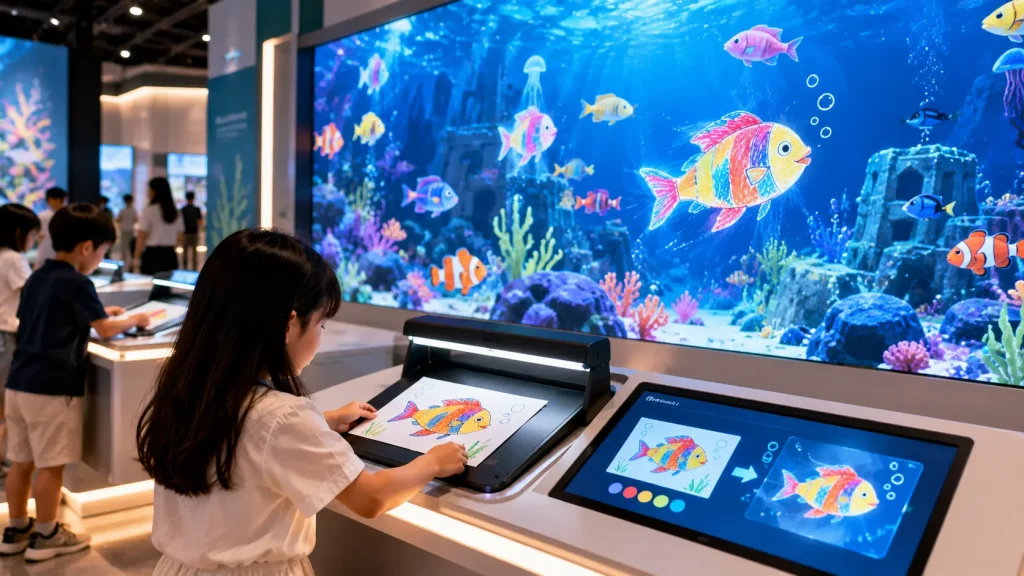
A visitor’s hand-drawn creation can become part of a shared digital world.
The familiar example is a child colouring a fish, scanning the artwork and then watching that exact design appear inside a large digital aquarium.
But the same interaction can go much further.
Visitors could design a car and see it enter a digital racetrack, draw an aircraft and watch it fly across a projected sky, create a building and add it to a shared city, or design a character that enters an animated environment.
The key experience is the transformation from something personally created by hand into something alive on screen.
How it works:
The visitor’s artwork is captured using a scanner or camera. Software isolates the relevant drawing, maps it onto a prepared digital asset and introduces it into the real-time environment.
Best for:
Children’s attractions, shopping malls, museums, education centres, family events and public installations.
10. Connected Physical Sculpture
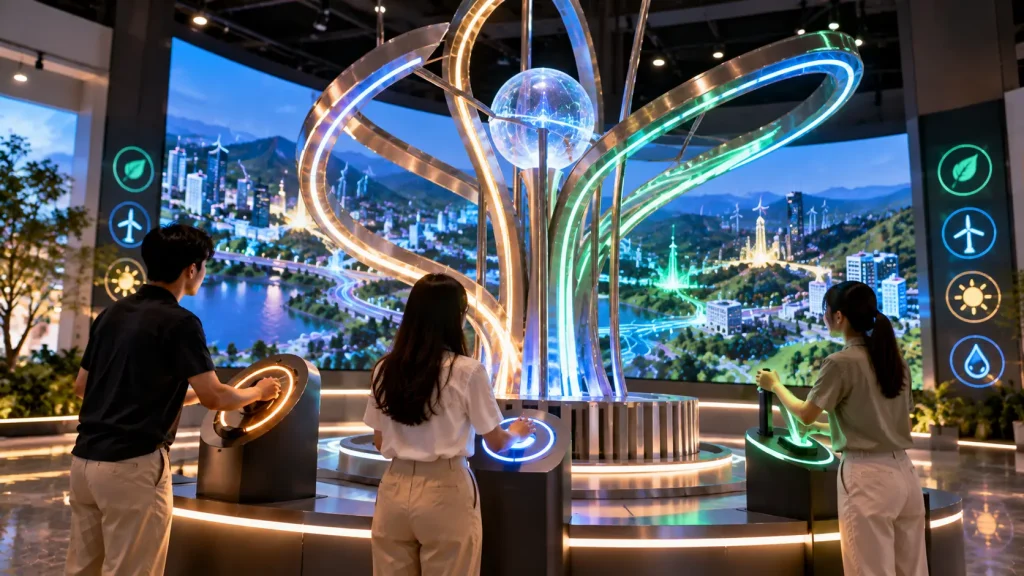
An interactive sculpture can turn several physical actions into one collective digital outcome.
Imagine a sculptural installation containing several different controls. One visitor rotates a ring, another moves a lever and a third touches a conductive surface.
Each action affects one part of the installation: lighting changes, mechanical elements move, sound layers appear and surrounding digital visuals evolve.
When several people interact at the same time, the sculpture reaches its complete state and triggers a larger audiovisual response.
This turns the installation itself into the interface rather than adding a separate touchscreen beside it.
How it works:
Multiple physical sensors and controls connect to a central interactive system. Their combined states control lighting, sound, screens, projection or mechanical elements in real time.
Best for:
Corporate headquarters, flagship stores, public spaces, brand experience centres, museums and permanent installations.
Choose the Physical-Digital Experience Based on Your Goal
| Experience Goal | Suitable Concept |
|---|---|
| Explore stories physically | Turn the Story Wheel |
| Let visitors build something | Build & Scan Creation Station |
| Explore locations or categories | Place-to-Explore Physical Map |
| Explain hidden product technology | Product X-Ray Station |
| Explore company history | Physical Timeline Slider |
| Experiment with product attributes | Mix Your Formula |
| Explain systems and trade-offs | Build a Digital City |
| Make energy or engineering tangible | Mechanical Energy Machine |
| Turn visitor creativity into content | Scan Your Creation |
| Create a shared physical experience | Connected Physical Sculpture |
How Does a Physical-Digital Interactive Experience Work?
A physical-digital experience connects a real-world action to a digital response.
The basic interaction flow is usually:
Physical Action → Sensor / Controller → Interactive Software → Digital or Physical Response
For example, when a visitor rotates a physical wheel, an encoder measures its position. The interactive software receives that information and changes the corresponding animation on a display.
A more complex installation may combine several inputs and outputs. Moving a lever could change a projection, illuminate an LED strip, trigger sound and activate a physical mechanism at the same time.
The technology should therefore be selected according to the visitor action rather than simply adding sensors because they are available.
What Technologies Can Connect Physical Objects to Digital Content?
There are several ways to connect physical objects and actions with interactive software. The right method depends on what needs to be detected.
| Technology | What It Detects | Typical Use |
|---|---|---|
| RFID / NFC | Identity of a tagged object | Product recognition, tokens and physical maps |
| Rotary Encoder | Rotation and position | Wheels, knobs and rotating mechanisms |
| Linear Position Sensor | Movement along a track | Timeline sliders and physical selectors |
| Pressure / Load Sensor | Weight or force | Physical platforms, seats and weighted objects |
| Camera / Computer Vision | Objects, artwork, position or selected visual features | Scanning and object-recognition experiences |
| Magnetic Sensor | Presence or position of magnetic components | Modular building and placement experiences |
| Buttons / Switches | Simple physical input | Mechanical controls and activation sequences |
| Microcontroller | Connects multiple sensors and physical outputs | Custom interactive installations |
RFID, NFC or Sensors: Which Should You Use?
The answer depends on what the system needs to understand.
If the system only needs to identify which physical object has been placed, RFID or NFC can be practical. For example, different destination tokens can contain different tags so the system knows which content to display.
If the system needs to understand how far something has moved, a position sensor or encoder may be more appropriate.
If it needs to understand where an object is located, the solution might involve sensing zones, computer vision or another tracking method.
Some installations combine several technologies. A physical object might contain an RFID tag for identification while another sensor detects its position or movement.
Can Real Products Be Integrated Into the Installation?
Yes. Existing physical products can often become part of the interaction.
For example, an automotive component could be mounted on a rotating platform so visitors can physically inspect it while the digital content follows its orientation.
A real product package could be placed onto a recognition area to reveal its ingredients, manufacturing process or sustainability information.
Industrial equipment can also be integrated with sensors where appropriate, allowing selected movements or controls to influence the digital experience.
However, the product’s weight, size, material, movement, safety requirements and whether it can be modified should be confirmed before designing the interaction.
Who Builds the Physical Components?
A physical-digital installation may require both digital development and physical fabrication.
Depending on the project, fabrication can include:
- Custom cabinets and enclosures
- Metal frames
- Display structures
- Interactive tables
- Mechanical wheels and sliders
- Product mounting systems
- Sensor housings
- Decorative finishes
- Internal cable management
- Access panels for maintenance
The fabrication and interactive system should ideally be planned together. A beautiful physical structure can still create problems if there is insufficient space for sensors, computers, ventilation, cabling or future maintenance.
Should the Physical Mechanism Be Designed Before the Software?
They should normally be developed together.
The physical mechanism determines what information can be measured, while the software determines how that information should affect the experience.
For example, if a timeline slider needs to control content continuously from 1980 to 2026, the system needs to know the slider’s position throughout the rail. A simple switch at each end would not provide enough information.
Defining the interaction logic early helps the fabrication and software teams choose suitable components before production begins.
What Can the Physical Interaction Control?
The output does not need to be limited to a screen.
A single physical action can control several elements simultaneously:
- LCD or LED screen content
- Projection
- Real-time 2D or 3D graphics
- LED lighting
- Architectural lighting
- Sound effects
- Spatial audio
- Mechanical movement
- Physical indicators
For example, turning a mechanical crank could increase an energy value on a display while LED lights travel through a physical model and machinery sounds gradually become louder.
Combining outputs can make the relationship between physical action and digital response easier for visitors to understand.
Screen, Projection or LED: Which Output Is Better?
| Output | Suitable For |
|---|---|
| Commercial Display | Detailed information, smaller installations and sharp UI content |
| LED Screen | Bright environments and high-impact large visuals |
| Projection | Large surfaces, physical models, tables, floors and unusual shapes |
| LED Lighting | Physical feedback and architectural integration |
| Physical Indicators | Simple progress, status and mechanical feedback |
The output should support the physical concept. A Build a Digital City table, for example, might combine projection on the physical model with a separate display showing live sustainability indicators.
How Durable Should an Interactive Installation Be?
Durability becomes particularly important when visitors physically handle the installation.
A touchscreen can experience thousands of taps, but a physical installation may also be pushed, pulled, rotated, leaned on or used more aggressively than expected.
Public-facing installations should consider:
- Expected daily usage
- Maximum physical force
- Moving-part durability
- Replaceable components
- Sharp edges and pinch points
- Loose objects
- Child-friendly operation
- Cable protection
- Equipment ventilation
- Maintenance access
The physical interface should be designed for real visitor behaviour rather than only for controlled demonstrations.
How Do You Prevent Visitors From Damaging the Mechanism?
A good interactive mechanism should limit movement to the range that the system actually requires.
For example, a rotating control may include physical stops. A slider can be designed so visitors cannot pull it away from the rail. Sensors and electronics can be concealed inside the structure rather than exposed to direct contact.
The installation should also communicate naturally how it should be used. If visitors frequently need instructions such as “do not pull too hard”, the physical interaction may need to be redesigned.
Does a Physical-Digital Installation Need Internet?
Usually not for the core interaction.
Many installations can run locally using a computer, interactive software, microcontroller and sensors. This can be particularly useful for permanent installations and exhibitions where reliable operation is more important than continuous internet connectivity.
Internet access may still be required for:
- Cloud-based databases
- Remote monitoring
- Content management
- Live online data
- API integration
- User accounts
- Remote software updates
Where possible, the core visitor experience can be designed with an offline fallback so a temporary network interruption does not stop the entire installation.
Can the Installation Run Automatically Every Day?
Yes. Permanent physical-digital installations can be designed for repeated daily operation.
The system may include scheduled power control, automatic computer startup, automatic software launch, idle mode and scheduled shutdown.
It is also useful to plan what happens after unexpected conditions such as a power interruption or application restart.
For permanent visitor centres and showrooms, reducing the number of manual steps required from venue staff can significantly improve day-to-day operation.
Temporary Event Setup vs Permanent Installation
| Temporary Event | Permanent Installation |
|---|---|
| Portable structure | Integrated fabrication |
| Fast installation and dismantling | Long-term mounting |
| Operator can supervise | Should operate with minimal supervision |
| Rental AV equipment may be practical | Commercial-grade equipment is preferable |
| Short-term wear | Repeated daily visitor use |
| Manual startup may be acceptable | Automated operation is preferable |
A concept designed for a three-day exhibition should therefore not automatically be copied into a five-year visitor centre installation without reviewing the hardware, fabrication and operating requirements.
What Maintenance Is Required?
Maintenance depends on how many physical and electronic components are involved.
Typical maintenance may include checking moving parts, cleaning sensors, inspecting cables, replacing worn components, updating software and confirming that the physical mechanism remains correctly calibrated.
For permanent installations, important electronics should be accessible through service panels without requiring the entire structure to be dismantled.
Remote software support can solve some digital issues, but physical component failures may still require on-site servicing.
What Affects the Cost of a Physical-Digital Interactive Experience?
There is no single standard price because two installations that look similar can have very different technical requirements.
The main cost factors usually include:
- Physical fabrication complexity
- Number of interactive mechanisms
- Sensor and electronic hardware
- Interactive software development
- Real-time 2D or 3D content
- Screen, LED or projection equipment
- Mechanical components
- System integration
- Installation and testing
- Project duration
- Temporary or permanent usage
- Maintenance and support requirements
A simple physical dial connected to an existing display can be significantly less complex than a large multi-user installation containing custom fabrication, moving mechanisms, projection, lighting and several types of sensors.
How Should You Plan a Physical-Digital Experience?
A useful planning sequence is:
Business Goal → Visitor Action → Physical Interface → Detection Method → Digital Response → Visitor Outcome
For example:
Goal: Explain different smart-city decisions
Visitor Action: Place physical building modules
Physical Interface: City planning table
Detection: Tagged modules and sensing zones
Digital Response: City visual and sustainability indicators update
Outcome: Visitor understands how different planning decisions affect the city
This approach helps prevent the project from becoming a collection of technology without a clear visitor purpose.
What Information Is Needed for a Quotation?
Providing the physical and technical requirements early helps determine whether the concept is practical and how it should be built.
Useful information includes:
- Project location
- Event or opening date
- Temporary or permanent installation
- Available floor space
- Floor plan and dimensions
- Photos or videos of the site
- Expected visitor profile
- Estimated simultaneous users
- Preferred interaction concept
- Products or physical objects to be integrated
- Existing displays, LED screens or projectors
- Required content and languages
- Brand guidelines
- Required data or API integration
- Expected operating period
For permanent installations or projects involving significant custom fabrication, a site survey and technical discussion may be required before the final design and quotation are confirmed.
Frequently Asked Questions
Can an existing physical product be made interactive?
In many cases, yes. Sensors, tracking systems or custom mounting can be added around an existing product without necessarily changing the product itself. Feasibility depends on its size, material, movement and how the interaction should work.
Can physical controls work without a touchscreen?
Yes. Wheels, knobs, sliders, levers, buttons, tagged objects and other physical controls can directly control digital content without requiring a touchscreen interface.
Can several physical controls work together?
Yes. Multiple controls can be connected to the same interactive system. Their combined inputs can influence one shared visual, sound, lighting or mechanical response.
Can the installation collect visitor data?
Yes, if data collection is part of the project requirements. Interaction choices, selected configurations or other non-personal activity can potentially be recorded. Personal information requires an appropriate registration and data-handling approach.
Can the system be reused for different exhibitions?
Yes, if portability and reuse are considered from the beginning. Modular fabrication, replaceable branding and configurable software can make a physical-digital system easier to redeploy.
How early should a custom installation be planned?
Custom physical-digital projects should ideally be discussed early because software development, electronics, fabrication, content production, integration and testing all need to work together before installation.
Physical-Digital Interactive Experiences in Malaysia
MyDigital Asia develops custom interactive experiences that connect physical actions, objects and environments with digital content for exhibitions, visitor centres, showrooms, events and permanent installations in Malaysia.
Depending on the concept, a project can combine custom interactive programming, sensors, RFID or NFC, physical controls, fabrication, projection, displays, LED technology, real-time graphics and system integration.
The objective is not to add a physical control simply for novelty. The physical interaction should make the story, product or experience easier to understand and more memorable for the visitor.
Planning a Physical-Digital Interactive Installation?
If you already have a reference idea, physical product, floor plan or visitor journey in mind, the next step is to determine how the physical action should connect with the digital response.
Share your project location, dimensions, project date, physical objects, preferred interaction and expected visitor flow with MyDigital Asia to evaluate a suitable technical approach.
Related Interactive Experience Guides
- Sensor-Based Interactive Installation Ideas
- Interactive Installation Malaysia
- Interactive Installation Design Guide
- Interactive Wall Ideas
- Visitor Centre Interactive Installation
Request a Free Consultation
Looking for Interactive Maps, Interactive Solutions or Event Technology?

LATEST POSTS